

40 Best Workforce Management Software of 2026: Reviewed

10 Best Workforce Management Software List


The best workforce management software helps you schedule shifts, track time, monitor performance, and stay compliant.
Whether you're managing remote teams, hourly workers, or complex labor regulations, the right software can help you cut costs, reduce errors, boost productivity, and make better decisions with real-time workforce data.
In this guide, I’ll walk you through the best workforce management software available today. I’ve evaluated dozens of tools and drawn from years of HR experience to help you confidently find a solution that fits your team's unique needs so you can get a stronger handle on your workforce operations.
You Can Trust Our HR Software Reviews
We've been testing and reviewing HR software since 2019. As HR professionals ourselves, we know how critical and difficult it is to make the right decision when selecting software.
We invest in deep research to help our audience make better software purchasing decisions. We've tested more than 2,000 tools for different HR use causes and written over 1,000 comprehensive software reviews. Learn how we stay transparent, and take a look at our software review methodology.
Table of Contents
Best Workforce Management Software: Comparison Chart
This comparison chart summarizes pricing, trial, and demo details for my top workforce management software selections to help you find the best software for your budget and business needs.
| Tool | Best For | Trial Info | Price | ||
|---|---|---|---|---|---|
| 1 | Best with real-time payroll insights | Free demo available | Pricing upon request | Website | |
| 2 | Best for AI-powered employee monitoring | 7-day free trial | From $10/user/month | Website | |
| 3 | Best for unified scheduling-to-payroll workflows | Free demo available | From $5/user/month (billed annually) | Website | |
| 4 | Best for gamifying employee performance management | Free demo available | Pricing upon request | Website | |
| 5 | Best workforce management software for hourly workers | 14-day free trial available | From $24/location/month | Website | |
| 6 | Best for time, attendance, and compliance | Free trial + demo available | From $6/user/month | Website | |
| 7 | Best for headcount planning & visualization | Free demo + free plan available | From $5/employee/month (billed annually) | Website | |
| 8 | Best for event staffing management | Free demo available | From £47/month | Website | |
| 9 | Best for global employees and contractors | Free demo available | From $5/employee/month | Website | |
| 10 | Best mobile software for deskless workforces | Free plan available + 14-day free trial | From $29/month (billed annually) | Website |

-

Remote People
Visit WebsiteThis is an aggregated rating for this tool including ratings from Crozdesk users and ratings from other sites.5 -
Checkr
Visit WebsiteThis is an aggregated rating for this tool including ratings from Crozdesk users and ratings from other sites.4.5 -
Deel HR
Visit WebsiteThis is an aggregated rating for this tool including ratings from Crozdesk users and ratings from other sites.4.8




Best Workforce Management Software Reviews
Explore in-depth reviews of the top 10 workforce management tools that made the cut. Each review breaks down key features, standout benefits, integrations, and ideal use cases—so you can quickly find the best WFM software for your needs.
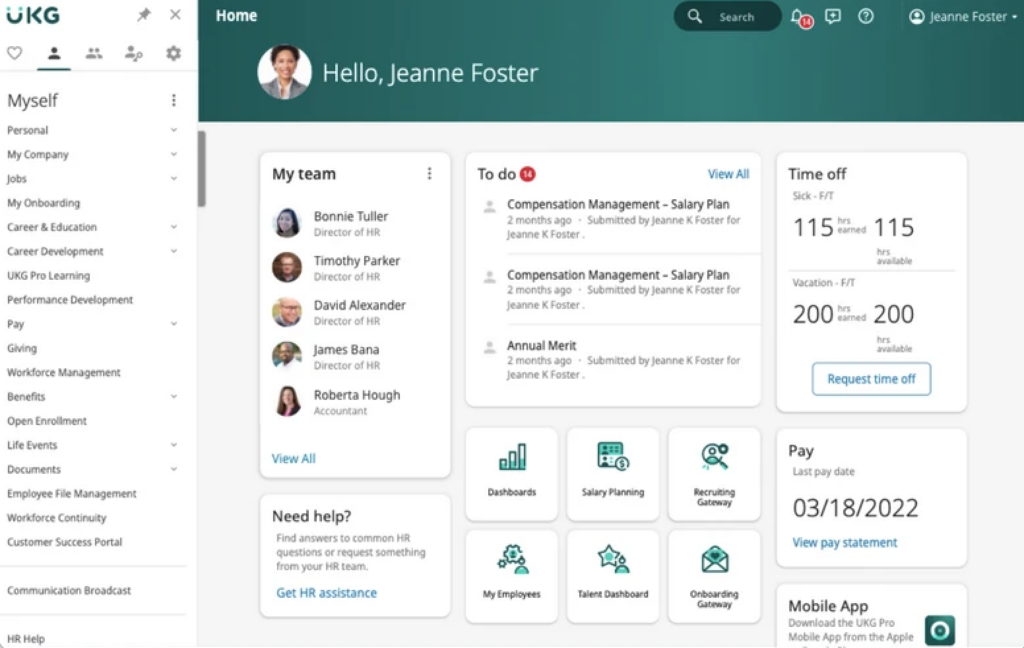
UKG is a workforce management platform built for large organizations and enterprises that need advanced scheduling, time tracking, and compliance tools to manage complex labor needs across multiple locations and roles.
Who Is UKG Best For?
UKG is a strong fit for mid-to-large enterprises managing distributed workforces across industries like healthcare, retail, and manufacturing.
Why I Picked UKG
I picked UKG as one of the best because its real-time payroll engine connects live workforce data directly to pay outcomes. When a timesheet is updated or an HR change is made, the payroll engine reflects it instantly with live gross-to-net calculations, so my team isn't chasing discrepancies at the end of a pay cycle. I also like the payroll intelligence layer, which uses AI-backed alerts to flag overtime threshold breaches and catch errors before a run is finalized. The analytics dashboards connect payroll data to broader labor cost trends, giving finance and HR teams a shared view of where spend is going in real time.
UKG Key Features
- AI-powered demand forecasting: Predicts workload demand in 15-minute intervals using machine learning to match staffing levels to real-time volume trends.
- Mobile employee self-service: Lets employees swap shifts, submit availability, request time off, and receive schedule notifications directly from their phones.
- Automated regulatory updates: Auto-updates tax codes, wage laws, and leave rules across 8,000+ U.S. tax codes and 40+ countries without manual input.
- ACA compliance tracking: Monitors employee eligibility, auto-populates 1094-C and 1095-C forms, and submits ACA filings directly from the platform.
UKG Integrations
Integrations include Workday, SAP SuccessFactors, Oracle HCM, ADP, Microsoft Teams, ServiceNow, DocuSign, PlanSource, Boomi, and OpenSesame.
Pros and Cons
Pros:
- Automated labor forecasting and demand planning
- Mobile self-service for employees and managers
- Real-time payroll and workforce analytics
Cons:
- Integration setup may require vendor assistance
- Customization requires significant implementation time

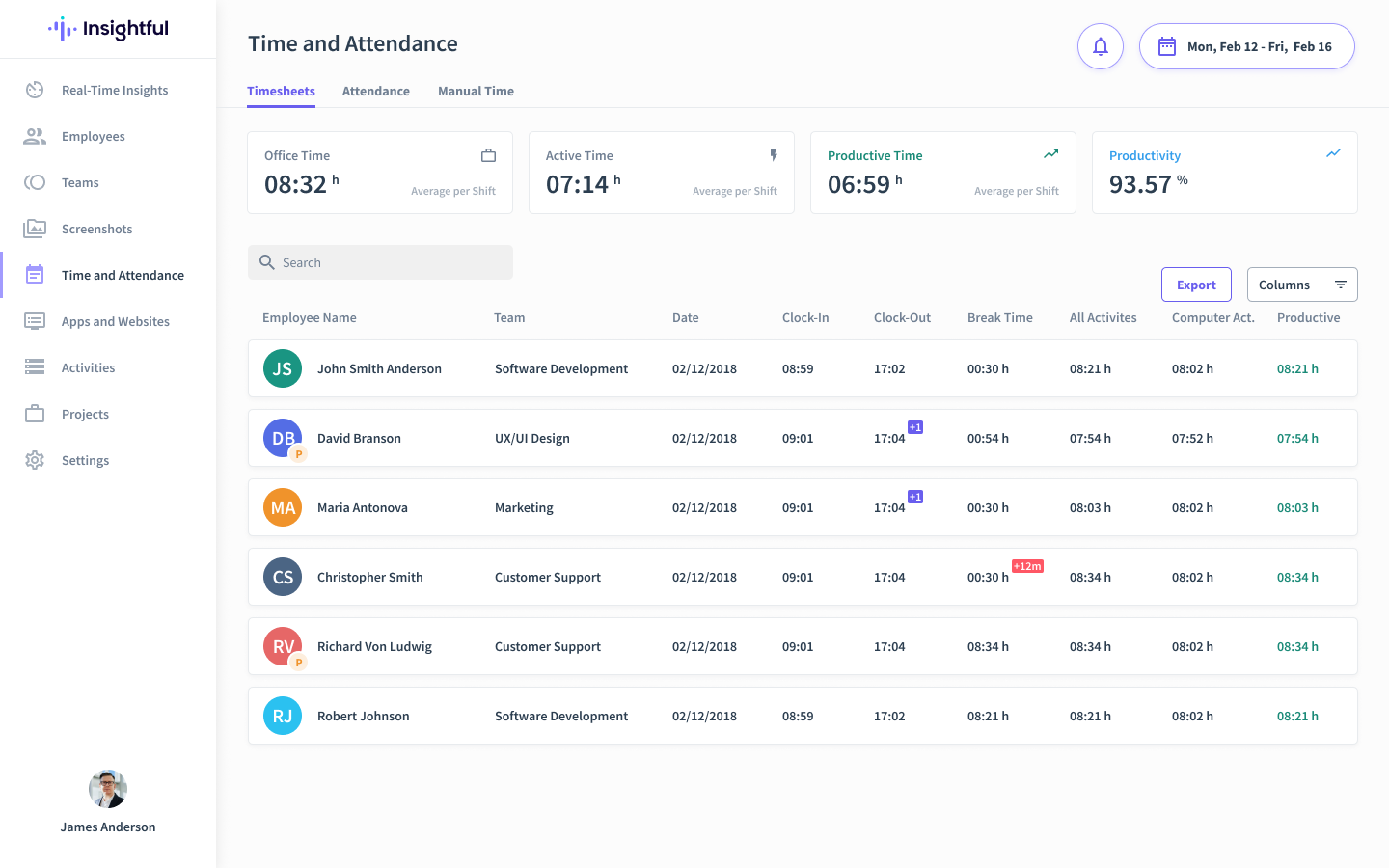
Insightful gives HR teams and business leaders a way to track productivity, monitor attendance, and analyze workflows across remote, hybrid, and in-office teams, helping organizations manage workforce performance and optimize daily operations.
Who Is Insightful Best For?
Insightful is a strong fit for mid-sized to large companies managing distributed teams who need detailed visibility into how employees spend their time across projects and tasks.
Why I Picked Insightful
Insightful earns its spot as one of the best on my shortlist because of InsightsAI, its built-in AI layer that turns raw workforce data into answers you can actually act on. Instead of digging through dashboards, I can ask InsightsAI a direct question—like which employees are trending toward burnout or where a team's focus time is being lost—and get a clear response in seconds. I also like how it identifies the behaviors and habits of top performers so you can replicate those patterns across the rest of the team. That kind of AI-guided visibility is what separates Insightful from tools that just collect data without telling you what to do with it.
Insightful Key Features
- Screen monitoring: Captures screenshots and records app usage to give managers a visual record of how employees spend their time during work hours.
- Location insights: Segments productivity data by work location—office, home, or hybrid—so you can compare performance across different work environments.
- Workflow analysis: Maps out how work moves through your team to surface bottlenecks and identify where processes can be tightened up.
- Customizable reports: Generates automated, scheduled reports with configurable metrics so you can track the workforce data that matters most to your team.
Insightful Integrations
Integrations include Jira, Trello, Asana, Aha, ClickUp, Zoho BugTracker, Azure DevOps, Basecamp, Bitbucket, and GitHub.
Pros and Cons
Pros:
- Switch between visible dashboards and discreet stealth mode
- Predicts turnover risk through digital activity shifts
- Flags overwork by monitoring shifts and break patterns
Cons:
- Setting up advanced AI mapping requires initial time
- No mobile app support

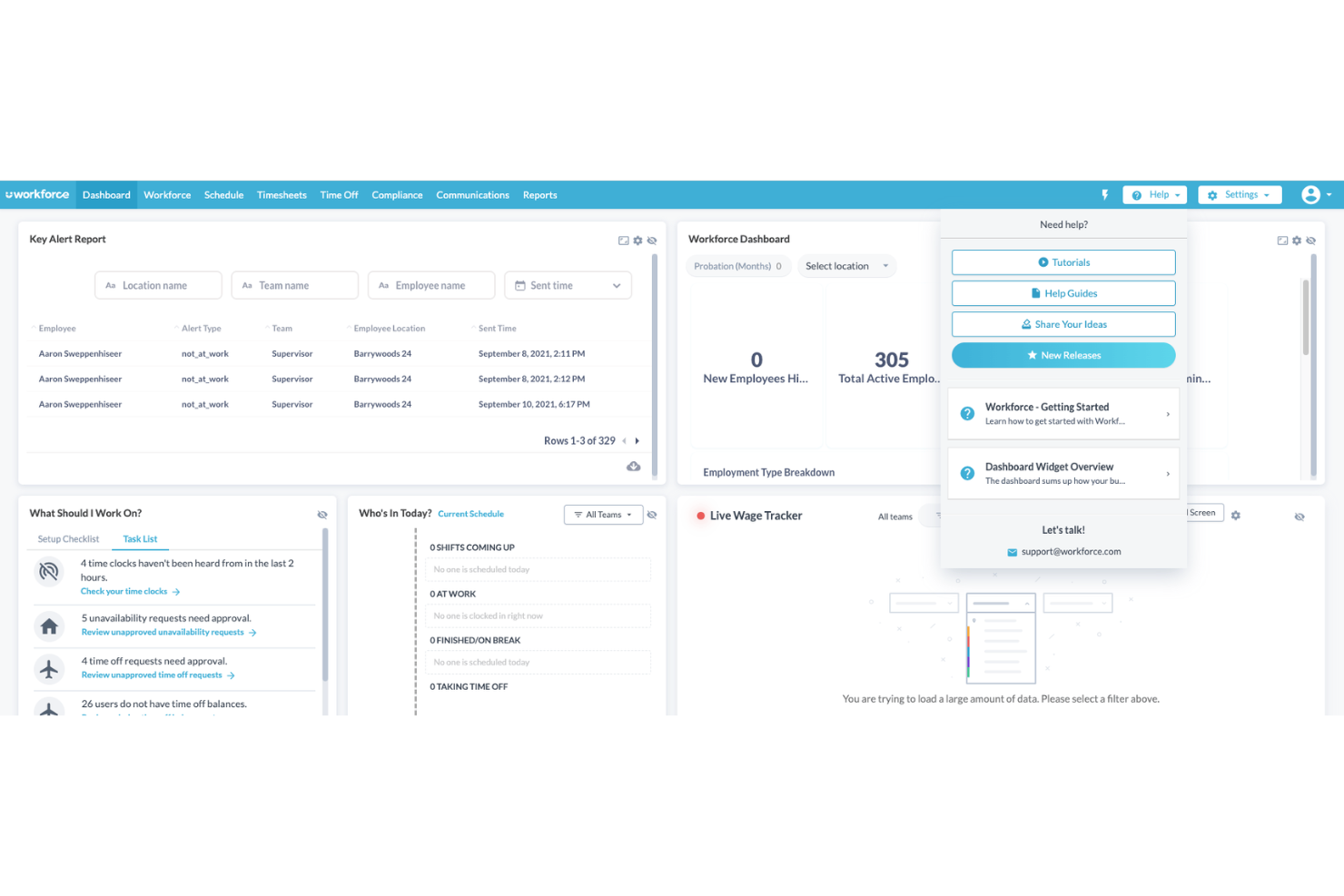
Workforce.com gives call centers and shift-based teams a way to manage scheduling, time tracking, and payroll in one place, helping managers handle complex staffing needs and compliance challenges.
Who Is Workforce.com Best For?
Workforce.com is a strong fit for operations and HR managers in shift-heavy industries like call centers, retail, and hospitality who need to coordinate large hourly workforces.
Why I Picked Workforce.com
I picked Workforce.com as one of the best because it's one of the few platforms that connects scheduling and payroll in a single system rather than bolting them together through integrations. Timesheet data flows directly into payroll—when a call center agent clocks out, that time is tracked against their pay rate, overtime rules, and role. Wage-and-hour automation applies weighted-average overtime and location-based pay rate changes on the timesheet before payroll runs. That keeps my team from manually reconciling schedules against timesheets or correcting pay errors after the fact.
Workforce.com Key Features
- Labor forecasting: Uses historical sales data, foot traffic, and weather patterns to predict staffing needs and generate demand-based schedules up to four weeks out.
- Attendance points system: Assigns attendance points based on your policy when employees clock in late, no-show, or call out, so managers can track patterns over time.
- GPS clocking with geofencing: Captures employee location at clock-in and clock-out and restricts punching to designated work areas to prevent buddy punching and off-site clock-ins.
- Fair Workweek compliance: Enforces advance schedule notice, maximum work hours, and minimum rest periods between shifts when building and publishing schedules.
Workforce.com Integrations
Integrations include ADP, Gusto, Intuit QuickBooks, Paychex, Oracle, Workday, Xero, Lightspeed, Square, and Shopify.
Pros and Cons
Pros:
- Mobile app supports clock-ins, shift actions, and self-service
- Forecasting tools help align staffing with predicted demand
- Accurate pay calculations based on roles, rules, and hours
Cons:
- Analytics depth may not match standalone BI platforms
- Some industries may require integrations not listed publicly

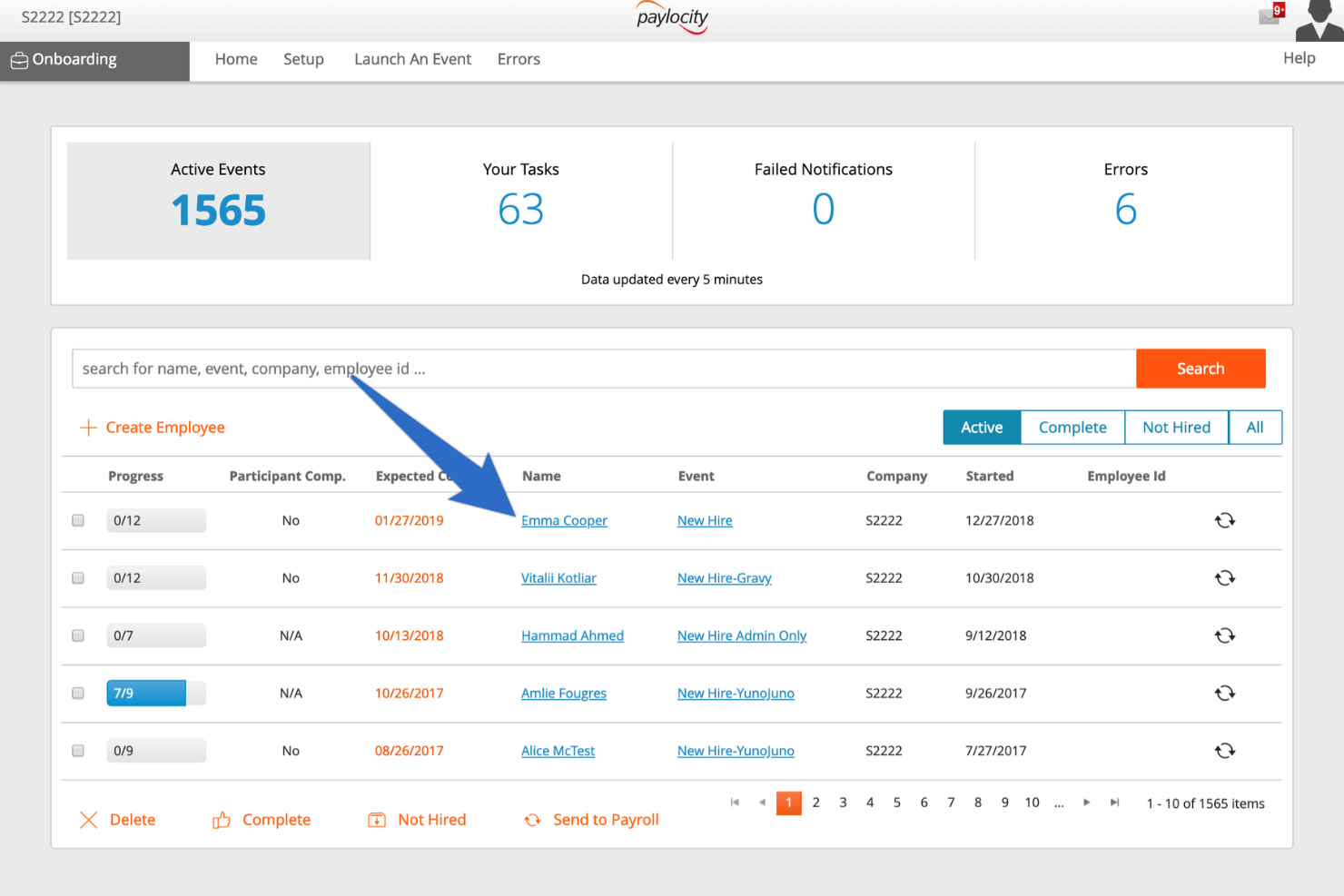
Paylocity is an HR and payroll provider with reliable solutions for taxes, expenses, recruiting, onboarding, employee development, compensation management, and benefits administration. Their mobile-friendly experience is great for modern employees who want access on-the-go with any smart device.
Why I picked Paylocity: Their software gamifies performance management, giving it a “social media” feel where users can pass kudos to one another for specific tasks, actions, or behaviors. They provide a built-in social hub to foster community in a way that breaks down departmental silos. Peer recognition and feedback survey tools help teams to feel engaged with the process of ongoing performance management.
Paylocity Standout Features and Integrations:
Features include time-tracking & attendance management, an employee time clock, geofencing, employee scheduling, scheduling templates, shift swapping, compliance monitoring, and automations. Paylocity is also available as a web application, via mobile devices, or in a kiosk format too, giving flexibility to different workforce structures.
Integrations are available through their extensive apps marketplace, and include key platforms like Clover, Concur, Expensity, Microsoft Dynamics 365, Oracle NetSuite, QuickBooks, Square, Xero, and other 300 others. They also have an API library for additional integration opportunities too.


Homebase is built for businesses that manage hourly teams and need an easy way to handle scheduling, time tracking, and basic HR tasks in one place. It’s especially useful for restaurants, retailers, and service businesses that rely on shift-based staffing and want a tool their employees can use on the go.
Why I Picked Homebase
I picked Homebase because it gives hourly teams practical tools that prevent scheduling mix-ups and reduce admin work. You can create schedules quickly using templates, auto-schedule shifts based on employee availability, and send text reminders so staff always know when they work.
I also like that you can manage time tracking and PTO requests in the same place, which helps you stay on top of labor costs and compliance, and its built-in messaging keeps shift conversations centralized, and teams can coordinate trades without managers needing to step in. These features make it a strong fit for businesses that want predictable, organized shift operations without a heavy HR system.
Homebase Key Features
Here are some standout features worth highlighting:
- Overtime Alerts: Flags upcoming overtime so you can adjust schedules before costs rise.
- Shift Claiming: Lets employees pick up open shifts without manual manager coordination.
- Built-In Team Messaging: Centralizes shift notes, updates, and announcements in one app.
- Onboarding and Document Storage: Collects W-4/I-9 forms and new-hire documents directly in the platform.
Homebase Integrations
Integrations include ADP, Gusto, Paychex, QuickBooks, Rippling, Square, Shopify, SurePayroll, Lightspeed, Indeed, and ZipRecruiter.
Pros and Cons
Pros:
- Text and mobile alerts reduce missed or forgotten shifts
- Free plan includes scheduling, time tracking, and hiring tools
- Auto-scheduling speeds up shift creation for hourly teams
Cons:
- Reporting options can feel limited for multi-location businesses
- Payroll features are only available as an add-on
New Product Updates from Homebase

Homebase Adds AI Scheduling Assistant for Faster Shift Planning
Homebase introduces Scheduling Assistant, AI-optimized shift creation, and automated conflict resolution. These updates reduce manual scheduling work while keeping teams aligned and shifts fully staffed. For more information, visit Homebase's official site.
 .
.
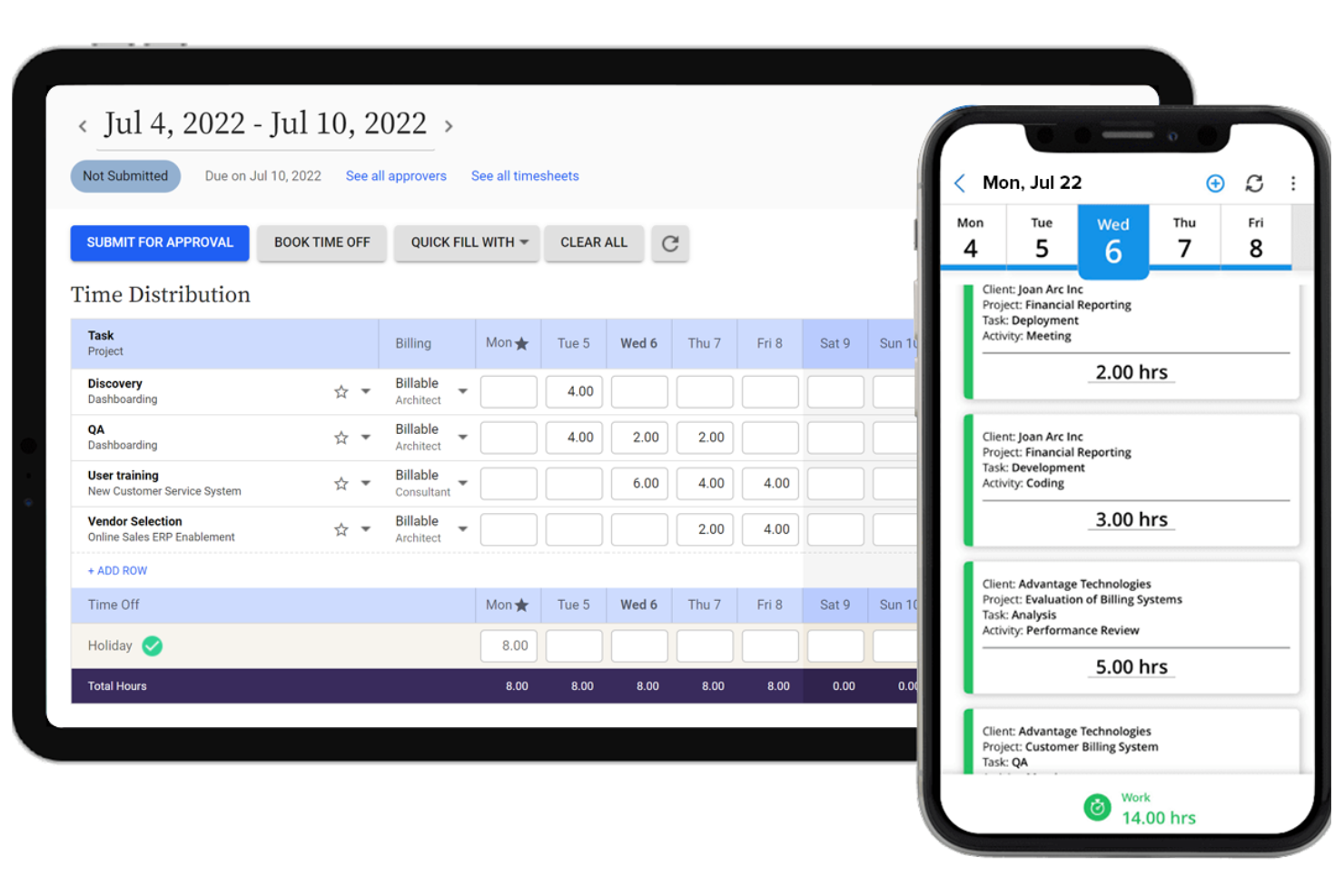
Replicon Time Tracking by Deltek helps HR teams and operations leaders in mid-sized and large businesses manage employee time, attendance, and compliance with AI-driven automation and real-time insights.
Who Is Replicon Time Tracking Best For?
Replicon Time Tracking suits project-driven organizations—like professional services firms, consultancies, and government contractors—that need precise time and attendance tracking across complex, multi-location workforces.
Why I Picked Replicon Time Tracking
I picked Replicon Time Tracking as one of the best for handling time tracking, attendance, and labor compliance in a single platform. ZeroTime™ automatically captures time from 100+ work apps, reducing the need for end-of-week manual time entry. Replicon covers labor laws across 145+ jurisdictions in 75+ countries, including DCAA, FAR, and NIST controls, which is a level of regulatory depth I haven't seen matched elsewhere. I also like that attendance, scheduling, time off approvals, and gross pay calculations all live in one place rather than being split across separate tools.
Replicon Time Tracking Key Features
- AI-powered timesheet validation: Automatically flags timesheet errors, anomalies, and missing entries before submission for manager review.
- Project time tracking: Tracks billable and non-billable hours against specific projects, tasks, and cost codes in real time.
- Configurable approval workflows: Routes timesheets and time-off requests through multi-level approval chains based on your org structure.
- Real-time workforce analytics: Generates dashboards and reports on utilization, overtime, and labor costs across teams and locations.
Replicon Time Tracking Integrations
Integrations include Jira, Salesforce, QuickBooks, SAP, Oracle, ADP, Microsoft Dynamics 365, and Slack; an API is available for custom integrations.
Pros and Cons
Pros:
- Highly customizable reports
- Activity tracking features
- Ability to analyze data in multiple ways
Cons:
- Advanced features, comes with a learning curve
- Interface could be easier to navigate
New Product Updates from Deltek Replicon Time

Deltek Replicon Time Adds Validation, Reporting, and Compliance Updates
Deltek Replicon Time introduces a My Schedule widget, enhanced validation rules, reporting optimizations, and new compliance controls. These updates improve visibility, reduce manual work, and help teams manage time tracking more efficiently. For more information, visit Deltek Replicon Time’s official site.
 .
.

ChartHop is a workforce management platform designed for HR teams and business leaders who need clear visibility into organizational structure, people analytics, and headcount planning to support smarter decision-making and growth.
Who Is ChartHop Best For?
ChartHop is a strong fit for mid-size to enterprise HR teams that need a centralized platform for managing org structure, workforce data, and people planning.
Why I Picked ChartHop
I picked ChartHop as one of the best because of how it handles headcount planning visually—something most workforce tools still do in spreadsheets. You can drag and drop roles directly on the org chart to model reorganizations, then switch to a dashboard view to see the budget impact in real time. The configurable approval workflows stand out: you can route headcount requests to finance, leadership, and people teams based on cost thresholds or change type, so nothing gets approved out of sequence. That kind of structured, cross-functional planning process is hard to replicate outside a dedicated platform like this.
ChartHop Key Features
- Time off management: Employees request time off directly in ChartHop, managers approve in-app or via Slack, and admins configure custom approval workflows per policy.
- Onboarding and offboarding workflows: Build custom task sequences, forms, and automated emails for new hires and departing employees, including automated survey triggers.
- 360-degree performance reviews: Configure review cycles with flexible question types, eligibility rules, and peer, upward, or downward review templates to fit your process.
- AI-powered dashboards: Build custom dashboards with a chart builder that surfaces AI-generated insights and trend summaries directly alongside your people data.
ChartHop Integrations
Integrations include ADP Workforce Now, BambooHR, Greenhouse, Gusto, Paylocity, Workday, UKG, Carta, QuickBooks, and Zenefits.
Pros and Cons
Pros:
- Detailed employee profiles with role-based permissions
- AI-powered dashboards for fast, visual insights
- Supports equitable compensation and headcount planning
Cons:
- Advanced features like performance management require additional modules
- Steep price point of the minimum contract may limit accessibility for small teams
New Product Updates from ChartHop
ChartHop Introduces Natural Language Filtering
ChartHop introduces natural language filtering to let users query data using plain language. This update makes it easier to find information without building complex filters. For more information, visit ChartHop’s official site.
 .
.

Parim is a workforce management platform built for organizations with large, flexible, and shift-based teams who need to simplify scheduling, time tracking, and staff communication.
Who Is Parim Best For?
Parim is a strong fit for staffing agencies, event companies, and hospitality businesses that manage large pools of hourly or shift-based workers.
Why I Picked Parim
Parim earns its spot on my shortlist because of how well it handles the complexity of event staffing at scale. I particularly like the event-based scheduling module, which lets you create shift templates tied directly to specific events, copy them in bulk, and track coverage across multiple job sites simultaneously. When you're managing hundreds or even thousands of staff across a single event, the self-scheduling feature is a real asset—you publish open shifts to workers who already match the required role and location, so you're not manually vetting every applicant. I also find the position coverage report useful here, since it compares planned staffing against actual allocations and lets you spot gaps before they become a problem on the day.
Parim Key Features
- Time and attendance tracking: Log worker hours via mobile clock-in and clock-out, with GPS verification to confirm staff are on-site.
- Worker profiles and compliance: Store certifications, right-to-work documents, and role qualifications directly on each worker's profile.
- In-app messaging: Send shift updates, job briefs, and announcements directly to workers through the Parim mobile app.
- Payroll reporting: Generate hours-worked reports that feed into payroll calculations, broken down by shift, role, or event.
Parim Integrations
Native integrations are not currently listed.
Pros and Cons
Pros:
- Responsive customer support
- Strong tools for event staffing and compliance
- Automated scheduling can save time and reduces errors
Cons:
- Some integrations have functionality limits
- Limited payroll automation; manual processing required


Deel HR is a workforce management platform built for companies managing teams across multiple countries, helping HR professionals and business leaders handle global payroll, compliance, and onboarding from a single dashboard.
Who Is Deel HR Best For?
Deel HR is a strong fit for HR teams at mid-size to enterprise companies that hire across borders and need a centralized way to manage international employees and contractors.
Why I Picked Deel HR
I picked Deel HR as one of the best because it's one of the few workforce management platforms built from the ground up for global teams—not retrofitted for international use after the fact. I particularly like the built-in country-specific compliance rules, which automatically apply local labor laws, time-off policies, and contract requirements across 150+ countries for both employees and contractors. My team also uses the worker classification tools, including an AI-powered misclassification assessment, to evaluate contractor relationships before they become a legal liability. That kind of built-in risk management is genuinely hard to find in a single platform.
Deel HR Key Features
- Global payroll processing: Run payroll for employees and contractors across multiple countries in their local currencies from a single dashboard.
- Time off and leave management: Configure and track leave policies by country, with automated approval workflows and real-time balance visibility.
- Onboarding workflows: Create custom onboarding checklists and automate document collection, e-signatures, and equipment requests for new hires.
- People analytics: Access workforce reports covering headcount, turnover, and compensation data to support HR planning and decision-making.
Deel HR Integrations
Integrations include FaceUp, Snowflake, DefensX, Microsoft Finance, Kintsugi, ReFresh OS, Revo.ai, Keeper, Human Interest, and Everyminute.
Pros and Cons
Pros:
- Simplifies payroll using multiple currencies
- Managed by 200+ local legal and tax compliance experts
- Tailored for international organizations
Cons:
- No free trial available
- Overlapping plan features require custom pricing
New Product Updates from Deel HR

Deel HR Introduces AI-Powered ATS for Hiring
Deel HR introduces an AI-powered ATS built into its platform. This update enhances hiring efficiency by automating sourcing, screening, and workflows across the recruitment process. For more information, visit Deel HR’s official site.
 .
.

Connecteam is a workforce management platform built for businesses with frontline, mobile, or distributed teams who need tools for scheduling, time tracking, communication, and task management all in one place.
Who Is Connecteam Best For?
Connecteam is a great fit for small to mid-sized businesses in industries like retail, hospitality, construction, and healthcare that rely heavily on hourly or field-based workers.
Why I Picked Connecteam
Connecteam earns its spot on my shortlist because it's purpose-built for teams that don't sit at a desk—and that focus shows in every feature. I like that the mobile app lets workers clock in and out with GPS verification, so I can confirm field staff are on-site without chasing them down. The built-in job scheduling tool lets me drag and drop shifts, set recurring schedules, and push instant notifications to workers' phones when something changes. For deskless teams, this real-time visibility is something most traditional workforce management tools don't provide.
Connecteam Key Features
- In-app chat: Send direct messages or group announcements to specific teams, departments, or individual employees from within the app.
- Digital forms and checklists: Create custom forms for daily reports, safety inspections, or task sign-offs that workers complete on their phones.
- Employee training courses: Build onboarding and training content with quizzes directly in the platform so new hires can complete it from any device.
- Time off management: Let employees submit time off requests through the app, with manager approval workflows and automatic updates to the schedule.
Connecteam Integrations
Integrations include QuickBooks, Gusto, Xero, ADP, Zapier, Wix, Lightspeed POS, PrismHR, Square, and BambooHR.
Pros and Cons
Pros:
- Unlimited custom jobs with all plans
- Free plan for up to 10 employees
- Designed specifically for field teams
Cons:
- Some advanced time clock features limited in basic plan
- Only one time clock in the basic plan
Other Workforce Management Software
Here are a few more workforce management systems that didn’t make the top list. I didn’t have room for a full review for each of these but they are still worthy of consideration:
- Aeqium
For complex business compensation planning
- Agendrix
For mobile shift scheduling in Canada
- Rotageek
For AI-powered auto-scheduling
- RemoFirst
For managing HR for global teams in one platform
- Sloneek
For comprehensive time management
- Zoho FSM
For work order management
- Ubeya
For AI-powered shift scheduling
- Veriato
For monitoring employee productivity
- Rippling
All-in-one platform for HR, payroll and IT functions
- GoCo
For small and mid-sized businesses
- Remote
Global workforce management with international specialists
- Oracle HCM Cloud
High-security workforce management
- Omnipresent
For global payroll compliance
- UZIO
For an HRIS
- FoxHire
For agencies placing remote talent
- Dayforce
For aligning labor with demand
- Arcoro
Workforce management software for construction companies
- Transformify
For handling diverse payment methods
- eResource Scheduler
For time tracking and drag-and-drop scheduling
- ExakTime
For managing a workforce of mobile staff
- Keka HR
For HR and payroll services
- Shiftboard
For workforce data intelligence
- SyncHR
For a flexible org chart
- SAP Total Workforce Management
For total workforce visibility
- Verint Workforce Management
For contingent workforce planning
- BlueYonder
For remote workforce management
- Calabrio Workforce Management
For call centers
- SumTotal Workforce Management
Workforce learning management app
- Alvaria Workforce Engagement Suite
Workforce management dashboard
- Fuse Workforce Management
For self-service scheduling


Related HR Software Reviews
If you still haven't found what you're looking for here, check out these other related tools that we've tested and evaluated:
- HR Software
- Payroll Software
- Recruiting Software
- Employer of Record Services
- Applicant Tracking Systems
- Learning Management Systems
Selection Criteria for Workforce Management Software
Selecting the right workforce management software requires a detailed understanding of common operational needs, such as improved scheduling and attendance tracking abilities, plus the ability to monitor for compliance and uncover insights from workforce data.
My approach to choosing the best workforce management software is grounded in thorough research into how these tools optimize workforce efficiency and productivity while addressing common buyer needs and pain points.
Here's a summary of the selection criteria I used to create this list:
Core Workforce Management Software Functionalities (25% of total score): To be considered for inclusion in my list of the best workforce management software, the solution had to support the ability to fulfill common use cases, including:
- Automating employee scheduling to match business demand
- Tracking time and attendance accurately for payroll processing
- Managing tasks and projects to prioritize work
- Ensuring compliance with labor laws and regulations
- Providing analytics for decision-making and workforce optimization
Additional Standout Features (25% of total score): To help me determine the best workforce management software available, I also took note of any unique features, including:
- AI-driven workforce analytics and reporting tools that offer deeper insights into efficiency and productivity
- Mobile-friendly solutions or dedicated apps for remote workforce management, including deskless or mobile workers
- Advanced leave and absence management features that go beyond basic tracking
- Customization options that allow businesses to tailor the platform to their specific needs, including both corporate branding and workflow customizations
Usability (10% of total score): To evaluate the usability of each workforce management software, I considered the following:
- An intuitive design that simplifies complex scheduling and management tasks
- A responsive user interface that's easy to navigate on desktop or mobile apps
- Workflow automation tools to streamline repetitive tasks
- Clear, understandable analytics dashboards that provide actionable insights
- Role-based access controls that are easy to configure for different user levels
Onboarding (10% of total score): To get a sense of each software provider's customer onboarding process, I considered the following factors:
- Quick setup processes and clear guidance for first-time users, including customizable templates
- The availability of training materials such as videos, webinars, or interactive product tours
- Support for migrating data from other systems into the new platform
Customer Support (10% of total score): To evaluate the level of customer support each vendor offered, I considered the following:
- The availability of multiple support channels, including email, phone, and chat
- The existence of a self-service knowledge base or other self-help resources to speed up troubleshooting
- The overall quality, responsiveness, and helpfulness of the support team during customer onboarding and post-purchase, as inferred from customer reviews
Value for Price (10% of total score): To gauge the value of each software, I considered the following factors:
- The availability of free trials or demos to test the software before purchasing
- Transparent pricing models that clearly explain which features are included at each level
- Tiered pricing plans that cater to different business sizes, from small to medium-sized businesses (SMBs) up to enterprise-level organizations
Customer Reviews (10% of total score): Evaluating customer reviews is the final element of my selection process, which helps me understand how well a product performs in the hands of real users. Here are the factors I considered:
- Whether a product has consistently high ratings across multiple review platforms, indicating a broad level of user satisfaction
- Specific praises, criticisms, or trends in customer feedback that indicate the software's strengths or areas for improvement
- Whether customer feedback specifically mentions issues with ease of use, customer support responsiveness, or lacking features
- Testimonials that highlight specific features that users found beneficial for their workforce management needs
Using this assessment framework helped me identify the workforce management software that goes beyond basic requirements to offer additional value through unique features, intuitive usability, smooth onboarding, effective support, and overall value for price.
Make sure the system you choose can grow with your company. You don’t want to outgrow it quickly, especially as your workforce gets larger or more complex.
How to Choose Workforce Management Software
Workforce management software can streamline scheduling, automate time tracking, support compliance, and reduce admin headaches—but only if you choose the right solution for your needs.
When choosing workforce management software, ask yourself the following questions:
- What workforce challenges are you trying to solve?
Start by identifying your biggest friction points. Are you still tracking time manually? Struggling with shift coverage or poor visibility into hours worked? Clarifying your pain points will help you focus on tools built to solve them. - What outcomes are important and how will you measure success?
Think about what success looks like. Do you want to reduce admin work, increase employee engagement, improve scheduling accuracy, or cut down on absenteeism? Defining your goals early keeps your search focused and prevents wasted effort. - Who will use the software?
Consider all user groups: HR, managers, and employees. Will they need admin-level control, scheduling tools, or self-service access? Clarify how many users you’ll need and make sure the system supports role-based access for different needs. - What is your budget?
Consider how much you're willing to invest, both upfront and long-term. Workforce management software pricing varies—some tools charge per user, while others offer bundled pricing. Be sure to factor in costs for setup, training, support, and any add-ons that may be essential for your team. - What software integrations do you need?
Choose software that works with your existing systems—like payroll, HRIS, or time-tracking tools—to avoid data silos and manual entry. If you’re looking to consolidate tools, prioritize platforms that offer built-in time and attendance, scheduling, and payroll features. - Will the WFM software fit your current workflows?
Look for software that’s intuitive and easy to implement. If you're digitizing for the first time, prioritize user-friendly platforms that won’t require a complete overhaul of your processes.

Trends in Workforce Management Software
Workforce management software is evolving to keep pace with shifting business priorities and workforce dynamics. As organizations adapt to hybrid work models, labor shortages, and rising compliance demands, software providers are rolling out new features to meet these challenges.
Here are the key trends shaping the WFM landscape currently:
- AI-driven Scheduling: AI-driven optimization algorithms are becoming more sophisticated, reducing manual effort and improving workforce allocation based on predictive analytics.
- Employee Engagement & Retention Tools: In response to the challenges of retention and employee engagement, workforce management software has shown an increase in features that monitor employee well-being and engagement levels. This includes features like employee survey tools, feedback collection, and communication tools that give employees a voice.
- Enhanced Communication Tools: With the rise of hybrid and remote working, there's an increasing demand for tools that can address the unique challenges of a dispersed workforce, including communication tools such as direct messaging to bridge communication gaps, and automatic notifications to schedules that are synced to mobile devices.
- Compliance Management: With constantly changing labor laws, compliance management features are critical, ensuring businesses stay up-to-date with regulations and avoid penalties.
- Virtual Reality (VR) Training Modules: Some workforce management platforms have started integrating VR for immersive training experiences, a novel approach to employee development.
- Blockchain for Timekeeping: The use of blockchain technology for secure and tamper-proof timekeeping records is an unusual yet emerging trend, offering unprecedented accuracy and security.
These trends in workforce management software indicate a shift towards more integrated, intelligent, and user-friendly solutions that also address ongoing challenges like employee engagement, retention, and creating a positive employee experience.
Software that embraces these trends can lead to more strategic decision-making, efficient processes, and a more engaged and compliant workforce. Implementing these tools can be a significant step towards building resilient, future-ready organizations.
What is Workforce Management Software?
Workforce management software is a digital tool that helps businesses schedule staff, track time, manage attendance, and stay compliant with labor laws.
It’s typically used by HR professionals and operations managers to streamline workforce operations, reduce manual errors, and avoid scheduling conflicts.
By centralizing workforce data, the software also supports better decision-making through real-time insights into labor costs, productivity, and staffing needs.
Features of Workforce Management Software
When selecting workforce management software, keep an eye out for the following key features:
- Employee scheduling: Build, manage, and update employee schedules without drowning in spreadsheets or chasing down last-minute changes. Workforce management tools automate shift creation, help you avoid understaffing or overstaffing, and ensure the right people are in the right place at the right time.
- Time and attendance tracking: Accurately track employee hours, breaks, overtime, and paid time off through digital time clocks or mobile apps. This reduces errors, streamlines payroll, and helps you maintain compliance with labor laws.
- Absence and leave management: Manage vacation days, sick leave, and other absences through a centralized system. Employees can request time off seamlessly, and managers instantly see updated availability so scheduling stays smooth.
- Labor forecasting: Use historical data and demand trends to predict staffing needs. Workforce management software helps you anticipate busy periods, reduce labor costs, and schedule proactively instead of guessing week to week.
- Payroll integration: Sync employee hours directly with your payroll system to eliminate manual data entry and prevent costly mistakes. This keeps pay runs accurate, timely, and headache-free.
- Compliance management: Stay aligned with wage laws, break requirements, overtime rules, and industry-specific regulations. Workforce management tools automatically flag potential issues, helping you avoid penalties and maintain fair labor practices.
- Task and shift management: Assign tasks, track completion, and ensure teams know exactly what to focus on during each shift. This boosts accountability and keeps daily operations organized and efficient.
- Mobile workforce support: A mobile-friendly platform allows employees to check schedules, request time off, swap shifts, and clock in from the field. This is essential for distributed or frontline workforces that aren’t tied to a desk.
- Team communication tools: Built-in messaging helps teams stay connected. Managers can send shift updates, reminders, or announcements instantly—reducing confusion and keeping everyone aligned.
- Analytics and reporting: Access real-time insights into labor costs, attendance patterns, productivity, and scheduling efficiency. These analytics help you make data-driven decisions and continually optimize your workforce operations.
Common Workforce Management Software AI Features
Many of these solutions are incorporating AI features to improve the customer experience, for example:
- Automated schedule optimization: AI builds smarter schedules by analyzing availability, labor laws, historical demand, and employee preferences—reducing conflicts and creating the most efficient staffing plan automatically.
- Predictive labor forecasting: AI uses real-time and historical data to predict staffing needs with greater accuracy, helping you cut labor waste during slow periods and avoid chaos during peak times.
- Smart anomaly detection: AI identifies unusual time punches, attendance gaps, early clock-ins, or potential payroll discrepancies before they become bigger problems.
- AI-assisted compliance monitoring: Automated compliance engines flag potential violations—like missed breaks, overtime limits, or regional labor rules—so managers can fix issues proactively.
- Intelligent task allocation: AI assigns tasks based on skill level, workload, availability, and past performance to keep operations running efficiently.
- Employee sentiment insights: Some platforms use AI to analyze communication patterns or feedback to detect burnout risks, engagement declines, or retention concerns.
- Chatbot-driven workforce support: AI-powered chatbots provide instant answers to scheduling, PTO, and policy questions 24/7—reducing admin load and improving employee experience.
- Automated shift recommendations: AI suggests the best shift swaps, replacements, or reassignments based on skills, availability, and compliance rules, making it easier to handle last-minute changes.
People more than ever need to have clarity into their vacation and time off. The culture is shifting from ‘Can I be gone?’ to letting my manager know ‘I will be gone.
Benefits of Workforce Management Software
Workforce management software helps businesses streamline operations, boost productivity, and create a more efficient, people-focused workplace.
By automating time-consuming tasks like scheduling, time tracking, and compliance management, these tools free up HR and operations teams to focus on more strategic work.
Here are several benefits you can expect to gain:
- Increased Operational Efficiency: Automating routine tasks like scheduling and time tracking reduces manual errors and frees up time for strategic activities. This efficiency gain means HR staff can focus more on employee engagement and less on paperwork, ultimately benefiting the business's bottom line.
- Improved Workforce Productivity: By leveraging features for task management, employees are better aligned with their roles, leading to optimized workloads and clearer expectations. This increased alignment ensures your team members are working on the right tasks at the right time, maximizing productivity.
- Enhanced Compliance: Compliance management tools help organizations stay on top of local, state, and federal labor laws, reducing the risk of costly legal issues. By automating compliance tasks, businesses can ensure they are always following the latest regulations without requiring extensive manual resources.
- Better Data-Driven Decision-Making & Insights: Analytics and reporting capabilities offer leaders a comprehensive view of workforce metrics, enabling data-driven decisions. This real-time visibility into workforce data helps managers identify trends, make informed decisions, and adjust strategies quickly to improve operational efficiency.
- Improved Employee Satisfaction & Retention: By empowering employees through a self-service portal, implementing workforce management software can lead to higher job satisfaction, lower turnover rates, and a more engaged workforce, as employees feel valued and in control of their work-life balance.
Ultimately, workforce management software can help you save time, reduce costs, and improve how you manage your most valuable asset—your people.
Costs & Pricing for Workforce Management Software
Workforce management solutions offer various plans and pricing options to serve different business sizes, needs, and budgets.
Below, I've outlined the common plan options and pricing from a free tier for small businesses or those wanting to test the waters, to more comprehensive, feature-rich packages designed for larger enterprises.
Plan Comparison Table for Workforce Management Software
| Plan Type | Average Price | Common Features |
|---|---|---|
| Free | $0 | Basic scheduling, time tracking, limited reporting, and access for a small number of users |
| Basic | $2-8 per user, per month | Automated scheduling, time and attendance tracking, basic compliance management, and employee self-service |
| Professional | $10-30 per user, per month | Advanced scheduling, real-time analytics and reporting, mobile access, and integration capabilities |
| Enterprise | Custom Pricing | Customizable features, advanced analytics, dedicated support, enterprise-grade security, and API access |
When considering which plan to choose, you should assess your specific business needs, the size of your workforce, and your budget. It's important to select a plan that not only meets your current requirements but also has the flexibility to adapt as your business grows and evolves.
If you only have a small number of employees, you can likely get started with a free or basic plan initially. However, there are many reasons why you may want to opt for a more advanced plan, including:
- Increased Workforce Size: Most basic plans limit the number of employees you can manage. As your employee headcount grows, you'll need to scale up to a plan that can accommodate more users and offer more extensive features and better scalability.
- Complex Scheduling Needs: As your company grows, managing complex schedules, shift swaps, and employee availability can become challenging. Advanced workforce management software offers robust scheduling features to streamline these tasks.
- Enhanced Reporting and Analytics: Basic plans often lack in-depth reporting capabilities. Upgrading allows for detailed analytics, helping you make data-driven decisions to improve productivity and efficiency.
- Integration with Other Systems: Most free or basic plans don't integrate well with other essential business systems like payroll, HR, or ERP, requiring you to scale up to a higher-paid plan to unlock this feature.
- Mobile and Remote Access: Most basic plans don't include mobile access or apps. However, this is an essential feature for teams with remote or field-based staff that's worth paying a bit extra for.
- Advanced Time Tracking: Basic software usually only offers simple clock-in and clock-out features. In contrast, advanced plans include sophisticated time-tracking options, such as GPS tracking, biometrics, and mobile accessibility.
- Better Support and Training: Upgrading typically comes with access to premium customer support and training resources. This ensures your team can effectively use the software and address any issues promptly.
Ultimately, it's important to secure a plan that offers the features you require to satisfy your current needs and solve your challenges without exceeding your budget.
Workforce Management Software: Frequently Asked Questions
Here are some answers to frequently asked questions you may have about workforce management software and how it works:
What is the best type of workforce management software for international teams?
Managing a global team adds complexity—think time zones, languages, local labor laws, and compliance. The best workforce management software for international teams should support:
-
Multi-country compliance and labor regulations
-
Localized payroll and tax handling
-
Time zone and language flexibility
-
Centralized dashboards for global oversight
For many organizations, all-in-one platforms that offer Employer of Record (EOR) services are a great fit. These solutions streamline hiring, onboarding, and managing remote teams across borders—without needing to set up local entities.
Here are a few top-rated platforms to consider:
Can workforce management platforms be customized for specific industries?
Yes, many workforce management platforms offer customization options to cater to the unique needs of various industries, including healthcare, retail, manufacturing, and more. This flexibility allows businesses to tailor features such as scheduling, compliance tracking, and labor forecasting to fit their specific operational requirements.
If you’re looking for a solution for a highly-regulated, safety-sensitive industry, my list of the best safety management software is worth reviewing too.
How does WFM software differ from HR software?
While HR software (HRIS/HRMS) covers broad HR tasks like recruiting, onboarding, and employee records, WFM software focuses specifically on operational workforce tasks such as scheduling, time tracking, and labor optimization.
Are there any hidden costs associated with these tools?
When it comes to workforce management software, hidden costs can arise in areas like implementation, training, additional features, and upgrades. It’s crucial to ask about these potential expenses upfront and consider them when calculating the total cost of ownership for these software solutions.
If you’re budget is quite tight, you may want to consider an affordable option like Connecteam, which offers lots of features for a low monthly cost for small teams (i.e., under 30 employees).
How do workforce management software handle data security?
The software developers behind workforce management software ensure compliance with global data protection regulations like GDPR, which is a critical component of their security measures. Other data security methods include:
- Robust encryption methods
- Multi-factor authentication, and
- Regular security audits to protect sensitive information.
What are common challenges WFM software solves?
- Overstaffing or understaffing issues
-
Manual scheduling errors
-
Compliance risks with labor laws
-
Time theft or inaccurate time tracking
-
Lack of visibility into labor costs.
How long does it take to implement WFM software?
Implementation time varies depending on the software’s complexity, integrations, and company size. Cloud-based solutions are usually faster to deploy, while on-premise or highly customized setups can take months. Factors like data migration, user training, and vendor support also impact how quickly the system goes live.
Does WFM software work for salaried employees too?
While primarily designed for hourly staff, many tools also track salaried employees for attendance, PTO, and compliance purposes.
Other Workforce Management Software Reviews
When it comes to workforce management, the right software for you will depend on your unique business needs. Here are some links to other software types that also cross over with workforce management tools:
- Employee Scheduling Software
- Attendance Tracking Software
- Employee Monitoring Software
- Contractor Management Software
- Succession Planning Software
- Performance Management Tools
- Talent Management Systems
- Employee Engagement Software
- Benefits Administration Software
- Staffing & Recruiting Software
Final Thoughts
To sum everything up, workforce management software can be a powerful asset for any organization looking to streamline operations, enhance productivity, and support employee engagement.
As a next step, consider identifying your primary challenges—be it scheduling, time tracking, or compliance—and align these with the software options that best fit your organization’s size, budget, and goals.
Investing in the right workforce management solution can create a more efficient, motivated, and agile workforce, setting your organization up for long-term success.
Stay Connected
To remain up-to-date on all the latest in people management, subscribe to our newsletter for leaders and managers. You'll receive insights and offerings tailored to leaders and HR professionals straight to your inbox.