

10 Best Performance Management Software & Tools of 2026

10 Best Performance Management Software Shortlist


The best performance management software helps HR professionals streamline reviews, set clear goals, and use real-time feedback to boost employee engagement and retention.
If you’re stuck chasing feedback in spreadsheets, struggling with inconsistent evaluations, or frustrated by systems that don’t deliver actionable insights, the right tool can transform your process.
With the right platform, you can automate performance cycles, align individual and team goals, collect 360° feedback, and uncover the data you need to make fair, informed decisions—without the admin headaches. This means more time spent developing people, and less time wrangling processes.
As a former HR administrator who’s facilitated over 1,000 performance reviews, I know what makes performance management software genuinely useful—and what gets in the way. In this guide, I’ll share the top-rated tools available today so you can find a solution that fits your people, processes, and culture.
Performance management software isn't just a convenience—it’s a critical tool for improving engagement, boosting retention, and creating a fair, transparent workplace. Now, let's find your perfect fit!
Why Trust Our Software Reviews
We've been testing and reviewing HR software since 2019. As HR professionals ourselves, we know how critical and difficult it is to make the right decision when selecting software.
We invest in deep research to help our audience make better software purchasing decisions. We've tested more than 2,000 tools for different HR use cases and written over 1,000 comprehensive software reviews.
Learn how we stay transparent, and take a look at our software review methodology.
Table of Contents
Best Performance Management Software: Comparison Chart
This comparison chart summarizes pricing, trial, and demo details for my top performance management software selections to help you find the best software for your budget and business needs.
| Tool | Best For | Trial Info | Price | ||
|---|---|---|---|---|---|
| 1 | Best for evaluating individual competencies | Free demo available | From $2 to $7/employee/month | Website | |
| 2 | Best for organizations of all sizes | Free demo available | Pricing upon request | Website | |
| 3 | Best for customized performance review processes | Free demo available | From $5/user/month (billed annually) | Website | |
| 4 | Best pulse survey features for quick feedback | Free demo available | From $4,999/year | Website | |
| 5 | Best for multi-level performance feedback | Free trial available | From $99/month | Website | |
| 6 | Best for continuous 1:1 performance feedback | Free demo available | From $5/employee/month | Website | |
| 7 | Best for incorporating multiple feedback sources | Free demo available | From $11/seat/month | Website | |
| 8 | Best for development-focused performance | Free demo available | Pricing upon request | Website | |
| 9 | Best for enterprise performance and goal-setting | Free demo available | Pricing upon request | Website | |
| 10 | Best for performance management in Teams | Free trial + free plan available | From $7/user/month (billed annually) | Website |

-

Remote People
Visit WebsiteThis is an aggregated rating for this tool including ratings from Crozdesk users and ratings from other sites.5 -
edays
Visit WebsiteThis is an aggregated rating for this tool including ratings from Crozdesk users and ratings from other sites.4.7 -
Checkr
Visit WebsiteThis is an aggregated rating for this tool including ratings from Crozdesk users and ratings from other sites.4.5





Best Performance Management Software Reviews
Finding the right performance management tool can transform the way you track, evaluate, and support your team’s growth. In this section, I’ve carefully reviewed the top 10 tools that stood out from the rest.
Below, you’ll find an in-depth breakdown of their standout features, strengths, and potential drawbacks, along with insights on why each tool made the cut. Plus, I’ll highlight key integrations and ideal use cases to help you pinpoint the best fit for your organization. Now, let’s dive in!
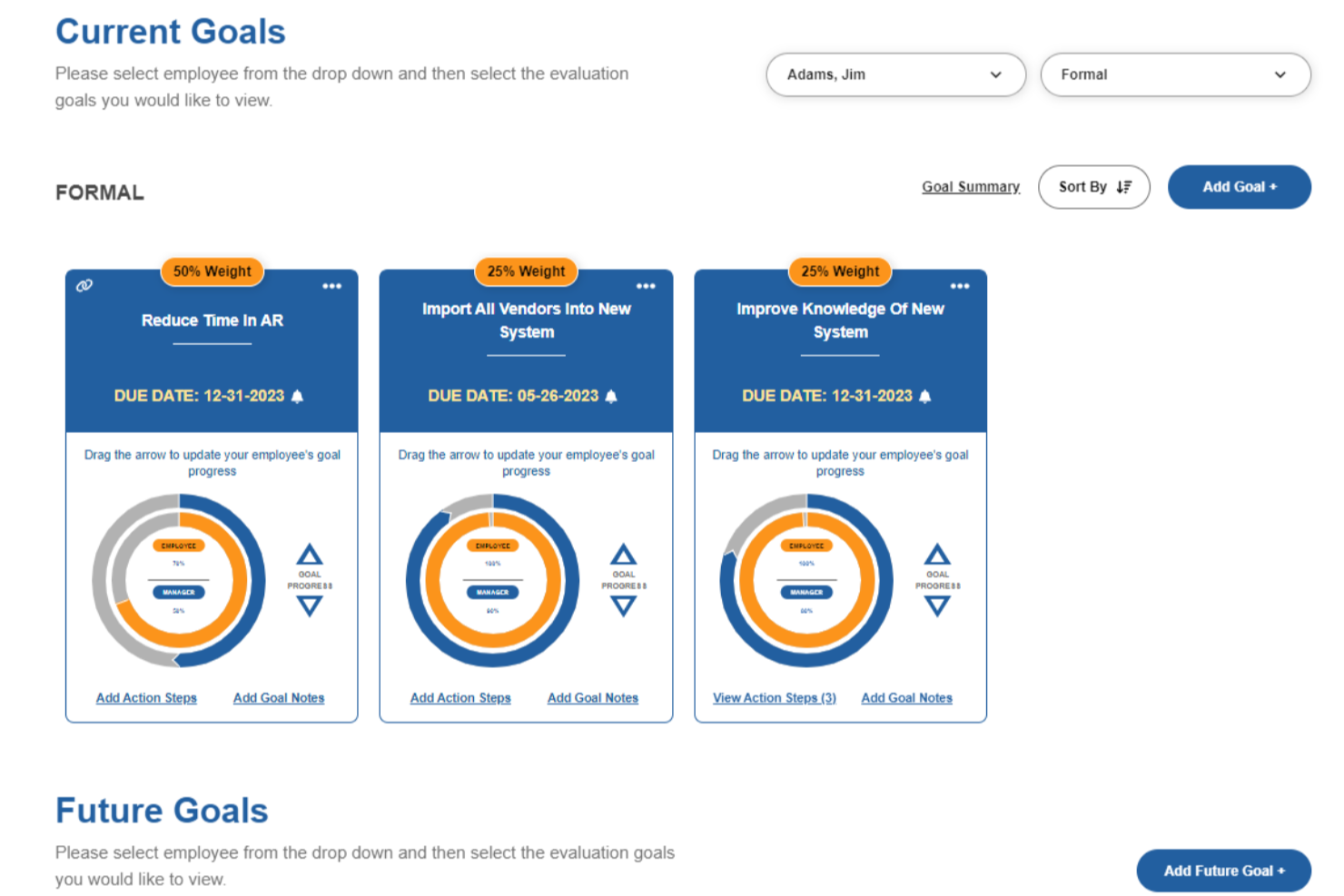
Performance Pro is a performance management platform designed for HR teams and managers who want to streamline employee evaluations, set clear goals, and support ongoing development across a range of industries.
Who Is Performance Pro Best For?
Performance Pro is a good fit for small to mid-sized organizations where HR teams need a structured, customizable approach to employee reviews and development.
Why I Picked Performance Pro
Performance Pro earns its spot on my shortlist because of how well it handles competency-based evaluations. I like that it lets you build competency libraries with customized weightings and ratings, so each employee's review reflects the specific skills that matter for their role. The link between competency assessments and learning activities is especially useful—when a gap appears in an evaluation, Performance Pro automatically assigns relevant development courses through its integrated learning management system. I also use the multi-rater and 360 review tools to get a fuller picture of where someone stands on a given competency, rather than relying on a single manager's perspective.
Performance Pro Key Features
- Goal management: Set, track, and align individual employee goals with broader organizational objectives throughout the review cycle.
- Automated review reminders: Schedule and send automated notifications to managers and employees to keep appraisal workflows on track.
- Performance dashboards: View real-time snapshots of review completion rates and employee performance data across the organization.
- Configurable appraisal forms: Build and customize review forms with flexible rating scales, sections, and question types to match your process.
Performance Pro Integrations
Integrations include Microsoft Teams and core payroll or HRIS systems via API or SFTP.
Pros and Cons
Pros:
- Integrations with learning and compensation drive development and rewards
- Visual goal-tracking keeps employees aligned with key objectives
- Customisable review forms tailor evaluation to each role
Cons:
- Some integrations may require admin effort
- Advanced analytics features may be less extensive vs enterprise platforms

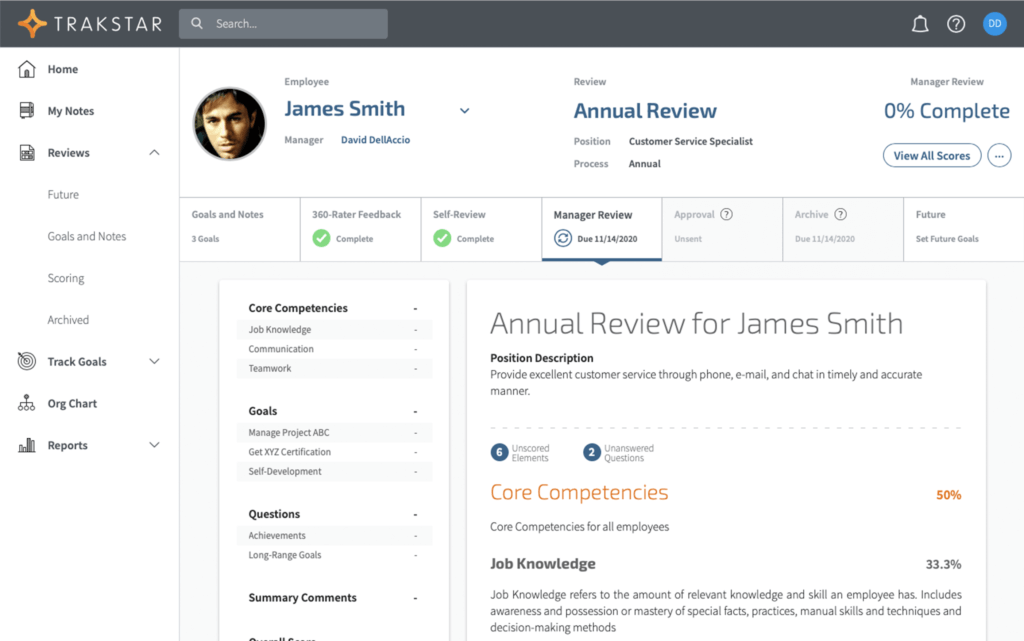
Mitratech Perform helps HR teams and managers drive employee growth with customizable performance reviews, goal tracking, and real-time feedback tools designed to support continuous improvement and align teams around business objectives.
Who Is Mitratech Perform Best For?
Mitratech Perform is a good fit for HR teams at companies of any size that need a structured, scalable approach to performance management.
Why I Picked Mitratech Perform
I picked Mitratech Perform as one of the best because its industry-leading configurability makes it adaptable across organizations of different sizes and structures. The 360-degree review feature is especially flexible—you can configure visibility, anonymity, and inclusion settings in combinations that most other tools don't support; that's important when managing reviews across multiple shifts or large distributed teams. I also like that Perform's automated review scheduling removes the administrative burden of planning appraisal cycles, so HR teams don't have to chase completions manually. The built-in distribution curve calculation is a strong differentiator—it performs the rating calculations, saving time during high-volume review periods.
Mitratech Perform Key Features
- Engagement surveys: Send pulse surveys to your workforce and break down results by department, question, or time period to track employee sentiment.
- Employee self-appraisals: Let employees reflect on their own performance and submit self-reviews as part of the formal review cycle.
- Competency assessment: Assign role-specific competencies to align expectations and evaluate employees against defined standards for their position.
- Benchmarking: Compare your talent management metrics against peer groups in real time to identify retention trends and workforce gaps.
Mitratech Perform Integrations
Native integrations are not currently listed.
Pros and Cons
Pros:
- Supports peer and upward feedback to increase fairness
- Customisable review templates suit different review cycles
- Enables alignment of employee goals with corporate strategy
Cons:
- Employee survey question-library appears limited compared to dedicated tools
- Some users report setup for advanced workflows takes time
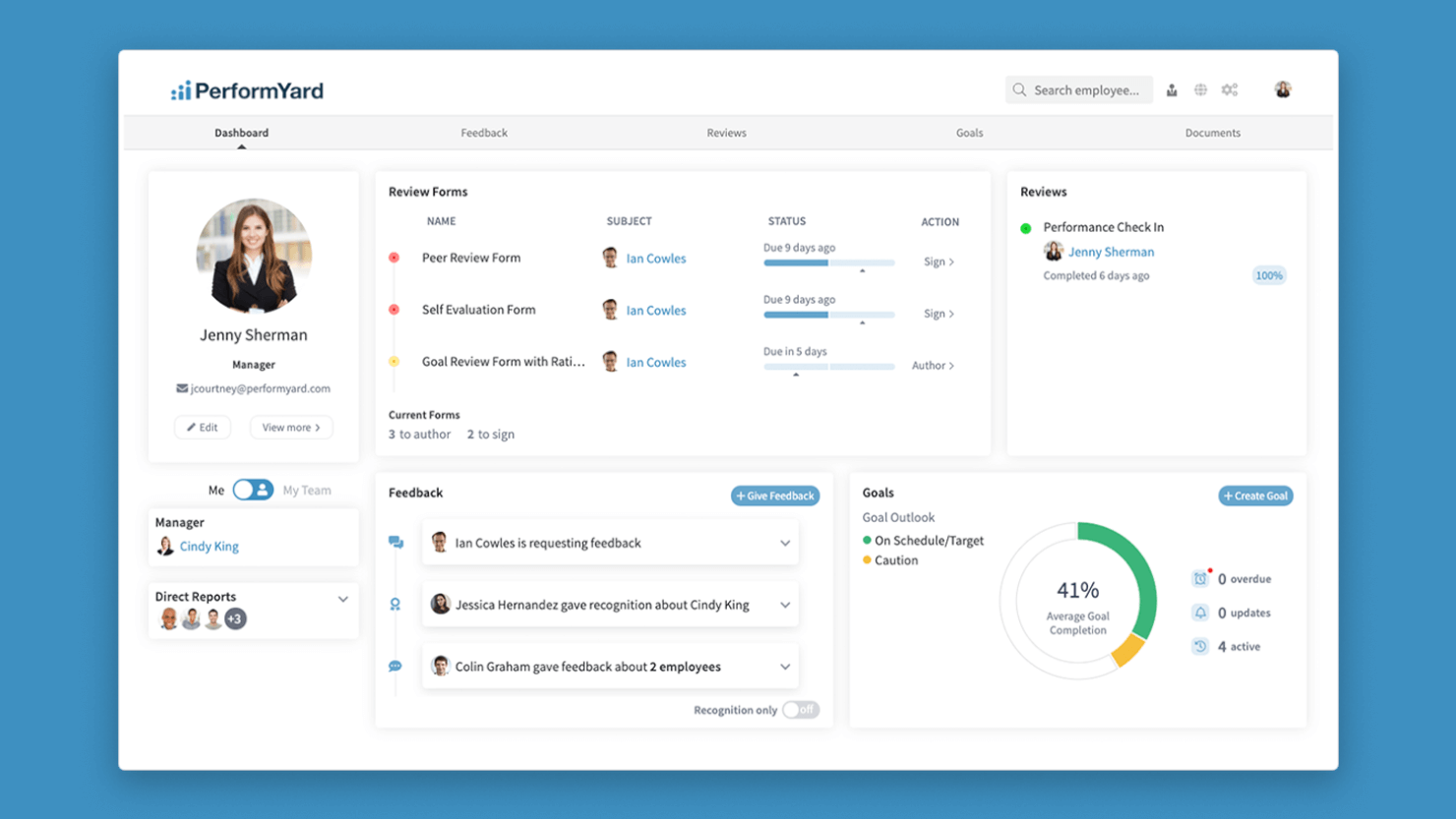
PerformYard gives HR teams and business leaders a flexible platform to manage performance reviews, set goals, and gather feedback, helping align employee development with organizational objectives.
Who Is PerformYard Best For?
PerformYard is a good fit for mid-sized organizations where HR teams need to tailor performance review cycles to match their existing processes and culture.
Why I Picked PerformYard
I chose PerformYard because it gives HR teams genuine control over how performance reviews are structured and run. I like that you can build review cycles from scratch—choosing the rating scales, question formats, and review frequency that match how your organization works, rather than forcing your process into a rigid template. Multi-directional feedback lets you combine self-assessments, manager reviews, and peer feedback within a single configurable cycle.
PerformYard Key Features
- Goal cascading: Links individual employee goals to team and company-wide objectives, with real-time visibility into progress at every level.
- Reporting and analytics dashboard: Generates visual charts and 9-box grids that track performance trends by individual, team, and department.
- Continuous feedback tools: Lets managers and employees send feedback, recognition, and performance notes outside of formal review cycles.
- AI-assisted writing: Helps managers draft and rephrase review comments, with tone elevation and multi-form summaries built into the review workflow.
PerformYard Integrations
Integrations include Microsoft Teams, Slack, HRIS systems, and SSO providers; an API is also available for custom integrations.
Pros and Cons
Pros:
- Strong syncing of employee data with HRIS tools
- Real-time goal-to-review linkage gives clearer performance tracking
- Lets you run multiple review cycles
Cons:
- Fewer native integrations beyond the major HRIS/SSO tools
- Some custom workflows can take time to configure

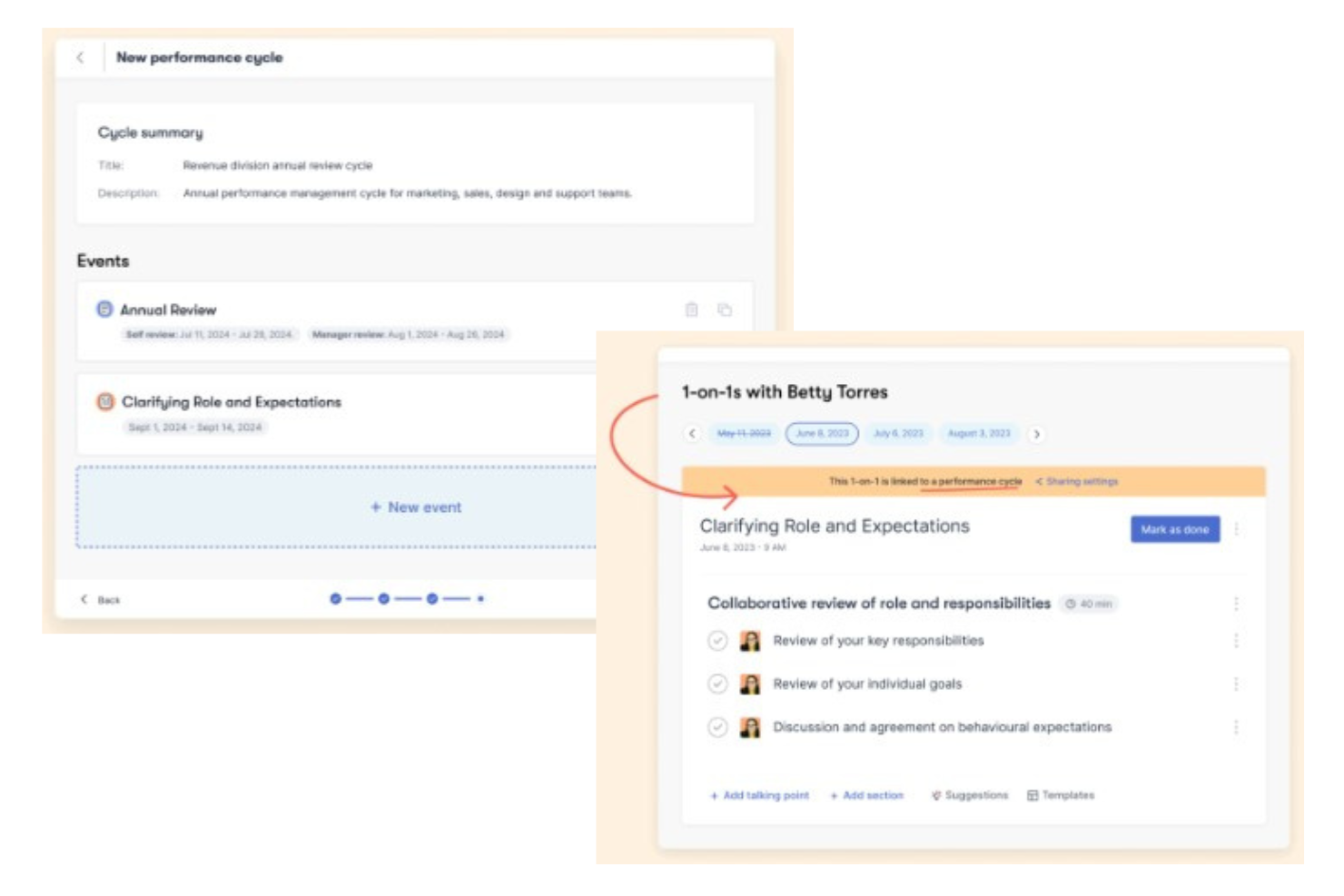
Workleap is a performance management platform that combines review cycles, 360-degree feedback, goal tracking, pulse surveys, 1:1 meeting tools, and AI-assisted coaching in one place.
Who Is Workleap Best For?
Workleap is a strong fit for mid-sized companies that want a dedicated performance management system without the complexity of an enterprise HCM suite.
Why I Picked Workleap
Workleap is one of my top picks because I love how its pulse survey setup removes the friction that usually kills survey participation. The automated cadence sends short, recurring surveys on a schedule HR controls, so employees aren't getting hit with a wall of questions at once. I also like that survey results feed directly into AI-generated highlights, which flag where issues are surfacing before they become turnover risks. The heatmap view then lets me compare team-level participation and engagement scores side by side without building a single spreadsheet.
Workleap Key Features
- 360-degree feedback: Collect structured input from peers, direct reports, and managers within a single review cycle.
- Goal and OKR tracking: Set individual and team goals with progress tracking tied directly to performance review cycles.
- 1:1 meeting agendas: Build structured talking points for manager-employee check-ins with context pulled from recent goals and feedback.
- AI review drafts: Generate review write-ups using AI based on employee goals and feedback collected during the cycle.
Workleap Integrations
Workleap offers native HRIS integrations with tools like BambooHR, HiBob, ADP Workforce Now, Workday, SAP SuccessFactors, UKG Pro, Personio, and Dayforce, plus it connects with Slack and Microsoft 365 for notifications and single sign-on. Workleap LMS is also available on Zapier, and an API is available for automating user and group management through custom integrations.
Pros and Cons
Pros:
- Modular pricing lets you buy only what's needed
- Continuous feedback replaces annual-only reviews
- AI drafts review comments and summarizes surveys
Cons:
- Submitted review reports aren't accessible after
- Anonymity weakens in smaller team sizes


Workable HR gives HR teams and business leaders a centralized platform to manage performance reviews, track employee goals, and support ongoing development across growing organizations.
Who Is Workable HR Best For?
Workable HR is a strong fit for small to mid-sized businesses that need a single platform to handle both hiring and employee performance management.
Why I Picked Workable HR
Workable HR earns its spot on my shortlist because of how well it handles multi-level performance feedback in a single, connected workflow. I like that reviews can pull in input from self-assessments, managers, direct reports, and peers all within the same cycle, so nothing gets collected in a silo. The customizable review templates let my team tailor the process to different roles or departments without rebuilding from scratch each time. Timeline tracking and progress reports also provide visibility into where reviews stand across the organization.
Workable HR Key Features
- Configurable performance review forms: Create tailored review templates with customizable question types for different roles or departments.
- Customizable review cycles: Set review cadences to fit your preferred schedule, keeping employees aligned with company and personal growth goals.
- Performance analytics: Generate performance management reports to track progress, identify top performers, and spot areas for improvement over time.
- Self-service employee portal: Let employees update personal information, access documents, and manage HR tasks directly, with built-in approval flows and change tracking.
Workable HR Integrations
Native integrations are not currently listed.
Pros and Cons
Pros:
- Data is unified across HR, hiring, and performance modules
- Templates can be tailored by department or role
- Multi-level feedback combines self, manager, and peer insights
Cons:
- Advanced analytics limited compared to specialist tools
- Performance module may cost extra on lower-tier plans
New Product Updates from Workable HR

Manage Time Off Policies Efficiently
Workable HR now allows bulk management of time-off policies via CSV import/export, enhancing control and efficiency. For more information, visit Workable HR's official site.
 .
.

Deel HR gives HR teams and business leaders a way to manage performance, feedback, and employee growth in one platform, making it easier for distributed and global teams to keep everyone aligned and engaged.
Who Is Deel HR Best For?
Deel HR is a strong fit for HR teams managing global or remote workforces who need a single platform to handle performance and people operations across multiple countries.
Deel HR's performance management features include continuous feedback, 360° reviews, OKR tracking, and AI-assisted feedback drafting through Deel Engage.
Why I Picked Deel HR
I've included Deel HR in my top picks because I love how it treats continuous feedback as a built-in part of the performance cycle rather than a bolt-on feature. Through Deel Engage, my team can run 360° review cycles that gather both anonymous and open feedback using quantitative and qualitative methods. What I find especially useful is the AI-assisted feedback drafting, which helps managers and employees write meaningful, specific feedback instead of staring at a blank form. Pair that with OKR tracking that cascades company goals down to individual contributors, and you get a system where 1:1 conversations are grounded in real data.
Deel HR Key Features
- Career progression frameworks: Define role expectations and growth paths so employees can see exactly what's needed to advance within the organization.
- Employee pulse surveys: Build and send recurring surveys to measure engagement, satisfaction, and development needs, with results feeding into centralized analytics dashboards.
- Learning management system (LMS): Create and assign training content to support employee development and close skill gaps across teams.
- Performance review calibration: Standardize how managers assess employees across teams to reduce bias and keep evaluations consistent.
Deel HR Integrations
Integrations include FaceUp, Snowflake, DefensX, Microsoft Finance, Kintsugi, ReFresh OS, Revo.ai, Keeper, Human Interest, and Everyminute.
Pros and Cons
Pros:
- Lets you assign visibility and anonymity settings in review cycles, offering cultural flexibility
- Competency and growth frameworks are integrated, not stand-alone
- Real-time goal tracking reduces reliance on static annual reviews
Cons:
- May require change-management for teams used to annual reviews only
- Performance tools are part of the Engage add-on, so cost may increase
New Product Updates from Deel HR

Deel HR Introduces AI-Powered ATS for Hiring
Deel HR introduces an AI-powered ATS built into its platform. This update enhances hiring efficiency by automating sourcing, screening, and workflows across the recruitment process. For more information, visit Deel HR’s official site.
 .
.
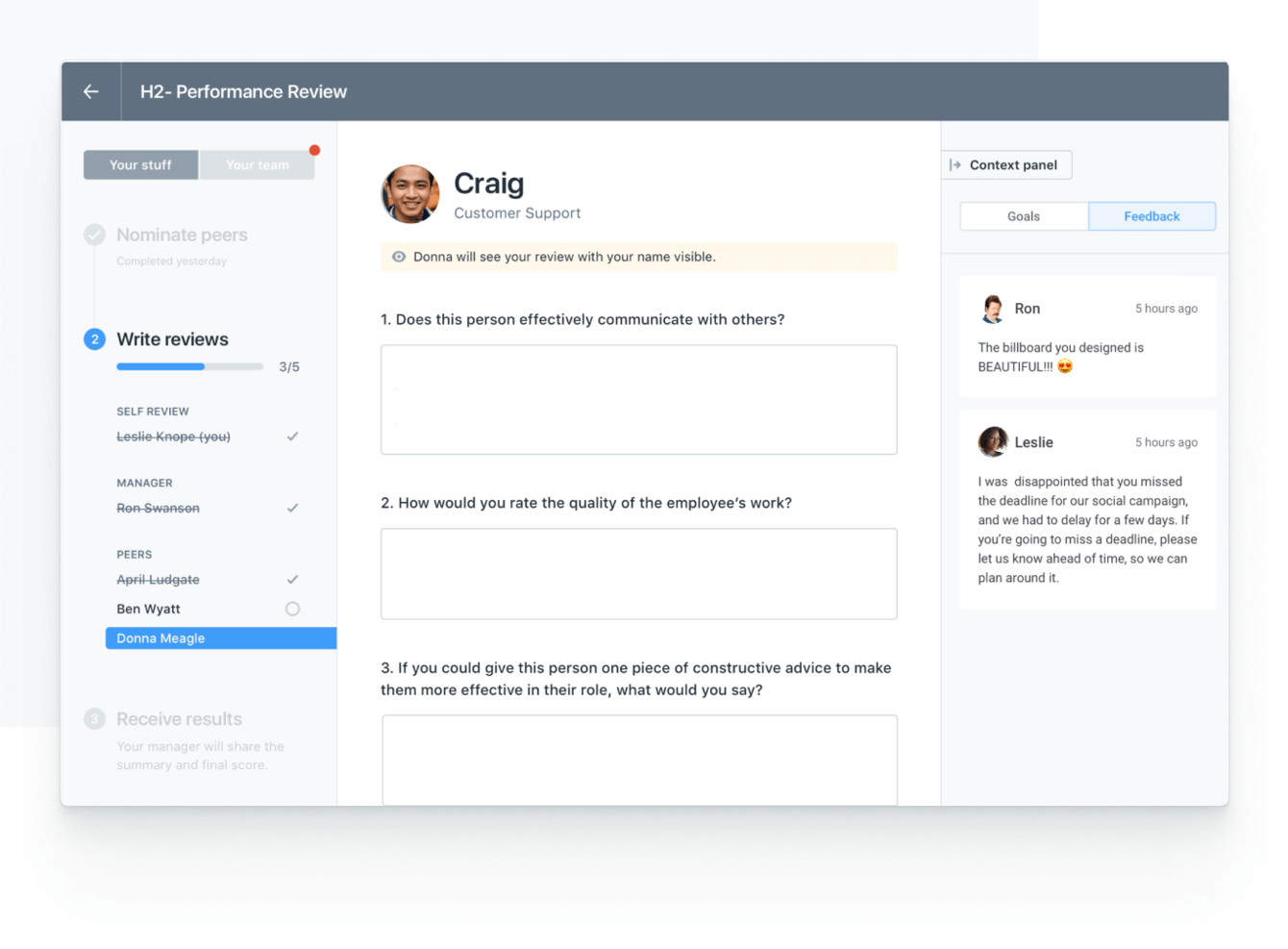
Lattice is a performance management platform for HR teams and business leaders focused on driving employee growth, aligning goals, and fostering a culture of continuous feedback and engagement.
Who Is Lattice Best For?
Lattice is a strong fit for mid-size to enterprise HR teams looking for a structured platform to manage the full employee performance lifecycle.
Why I Picked Lattice
Lattice earns its spot on my shortlist because of how well it pulls feedback from multiple directions into a single, coherent picture of employee performance. I particularly like the 360-degree review setup, where you can gather input from peers, direct reports, managers, and even the employee themselves—all within the same review cycle. On top of that, Lattice's real-time feedback feature lets team members share and receive input between formal review cycles, so performance conversations aren't limited to once or twice a year. That combination of structured 360 reviews and always-on feedback gives HR teams a much richer data set to work with when making talent decisions.
Lattice Key Features
- Goal and OKR tracking: Set, align, and track individual and team goals directly within the platform, with visibility across the organization.
- Employee engagement surveys: Run pulse surveys and engagement polls to capture employee sentiment at regular intervals.
- Performance analytics dashboard: View aggregated performance data and trends across teams to support manager and HR decision-making.
- 1-on-1 meeting tools: Schedule and structure recurring manager-employee check-ins with shared agendas and talking points.
Lattice Integrations
Integrations include ADP, BambooHR, Greenhouse, Gusto, HiBob, Jira, Lever, Microsoft Teams, Slack, and Workday.
Pros and Cons
Pros:
- 1:1 tools support structured manager-employee development talks
- Flexible review cycle templates adapt to different team needs
- Enables 360° feedback from managers, peers, and direct reports
Cons:
- Some users find the goal-tracking interface less intuitive
- Analytics may lack advanced customization for power users
New Product Updates from Lattice

Lattice Enables Custom Naming Across the Platform
Lattice enables custom naming flexibility, allowing admins to rename key platform terms to match internal language and workflows. This update helps organizations improve adoption and align the platform with company terminology. For more information, visit Lattice’s official site.
 .
.
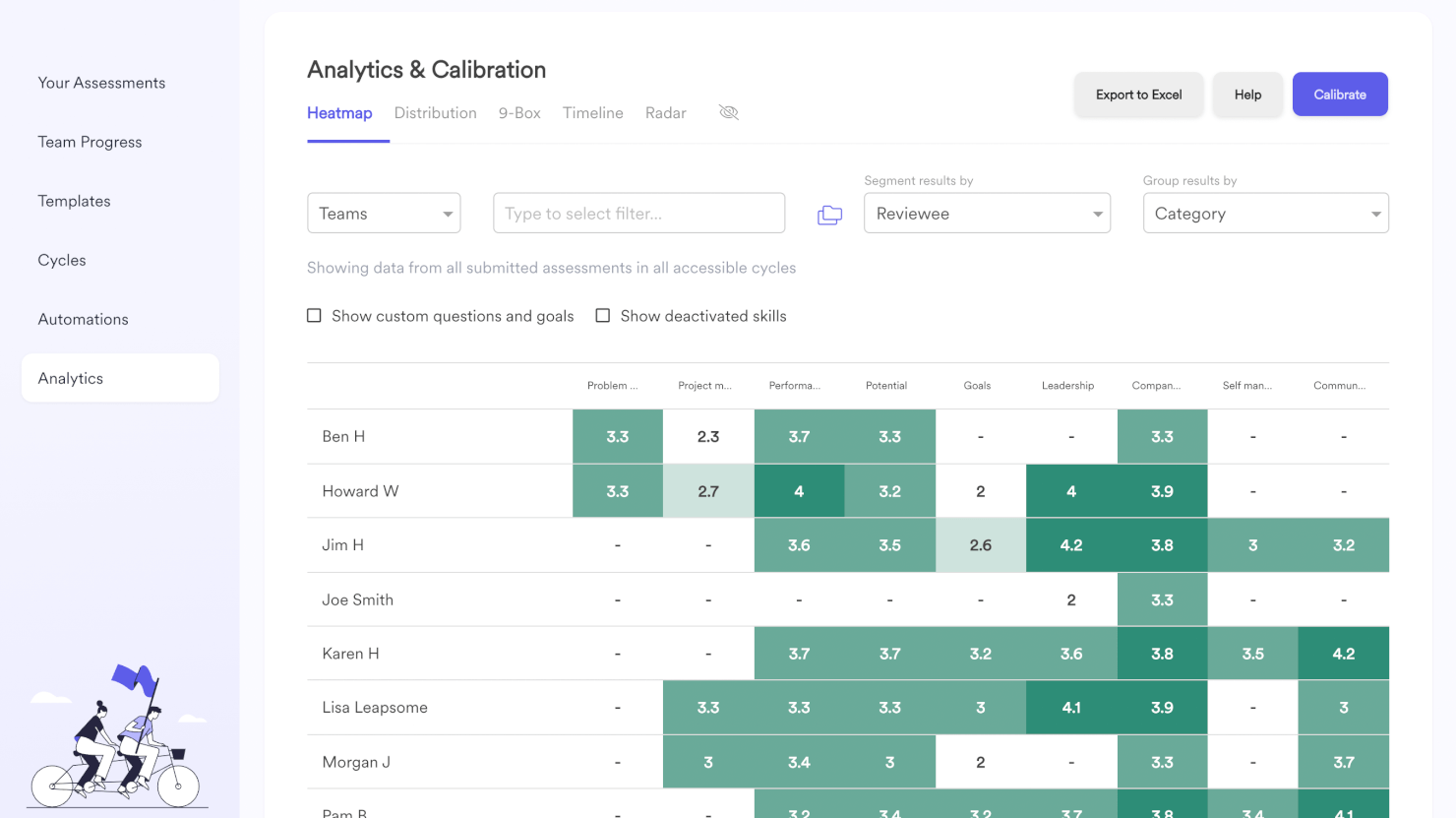
Leapsome is a performance management platform designed for HR teams and business leaders who want to drive employee growth, align goals, and foster a culture of continuous feedback and development.
Who Is Leapsome Best For?
Leapsome is a strong fit for mid-sized to enterprise companies that want to tie performance management directly to employee learning and career development.
Why I Picked Leapsome
Leapsome earns its spot on my shortlist because it connects performance reviews directly to employee development in a way that most tools don't. I like how competency frameworks are built into the review process, so feedback isn't just evaluative—it maps to specific skills and growth areas for each role. My team also uses the learning paths feature to follow up on review outcomes with targeted development content, which closes the loop between assessment and action. That tight connection between performance data and development planning is what makes Leapsome stand out for development-focused performance management.
Leapsome Key Features
- Goal and OKR tracking: Set, align, and track individual and team goals with progress visibility across the organization.
- Engagement surveys: Run pulse surveys and gather employee feedback with built-in analytics to identify trends.
- 1-on-1 meeting tools: Structure recurring check-ins with shared agendas, talking points, and action items.
- People analytics dashboard: View workforce data across performance, engagement, and growth in a single reporting view.
Leapsome Integrations
Integrations include Slack, Microsoft Teams, Jira, BambooHR, Workday, Greenhouse, ADP Workforce Now, Okta, G-Suite, and Personio.
Pros and Cons
Pros:
- Supports structured 1:1s for ongoing development discussions
- Aligns employee OKRs directly with company strategy
- Connects performance reviews to personalized growth plans
Cons:
- Some reports need manual configuration for advanced insights
- Setup requires initial mapping of skills and frameworks
New Product Updates from Leapsome

Leapsome Adds ADP Workforce Now Integration
Leapsome introduces ADP Workforce Now integration for payroll data synchronization. This update helps organizations keep employee data aligned between HR and payroll systems while reducing manual data transfers. For more information, visit Leapsome’s official site.
 .
.
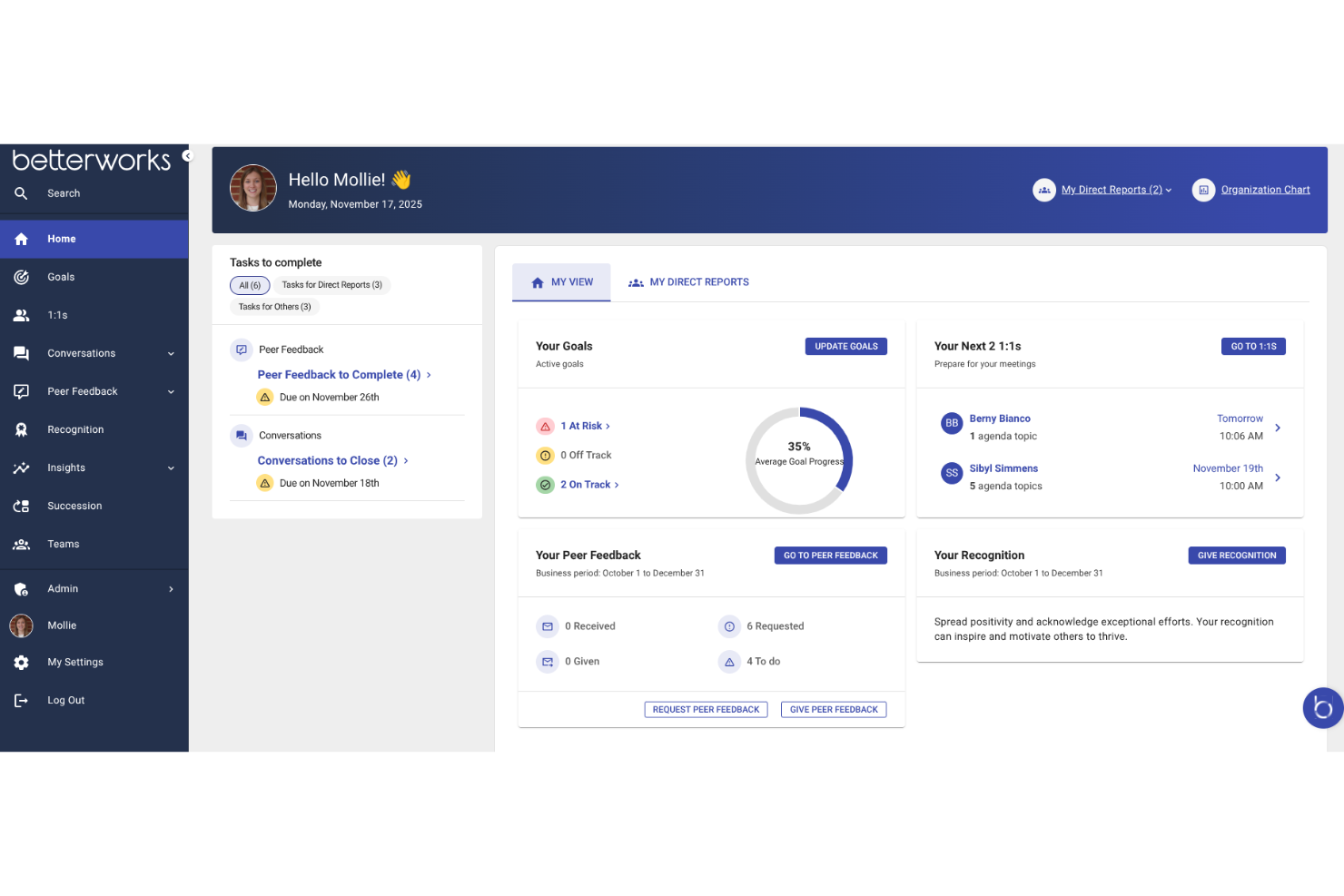
Betterworks is a performance management platform designed for large organizations that want to align teams, track goals, and foster ongoing feedback to drive business results.
Who Is Betterworks Best For?
Betterworks is a strong fit for mid-to-large enterprises that need a structured, scalable approach to connecting individual performance with company-wide goals.
Why I Picked Betterworks
Betterworks earns its spot on my shortlist because of how well it connects goal-setting to the full performance cycle at an enterprise scale. I particularly like the AI-powered Goal Assist feature, which reviews an employee's job title, past goals, and team priorities to suggest specific, strategically aligned goals—something especially useful when rolling this out across thousands of employees. I also use the cascading goals feature to push company OKRs down to team and individual levels with a few clicks, so when priorities shift, updates propagate across linked goals without manual changes. The fact that goal completion data surfaces directly into performance reviews means managers arrive with real context, not just memory.
Betterworks Key Features
- Performance calibration: Run structured calibration sessions to compare employee ratings across teams and reduce bias in evaluation outcomes.
- Continuous conversations: Launch instant check-ins and customize review templates by role, department, or region to keep feedback relevant and timely.
- 360-degree feedback: Collect peer, upward, and external feedback from clients or partners, which are included in performance reviews without manual consolidation.
- Employee engagement surveys: Build pulse surveys with anonymity controls and track sentiment trends like eNPS across teams and departments over time.
Betterworks Integrations
Integrations include Workday, ADP, BambooHR, SuccessFactors, UKG Pro, Jira, Asana, Slack, Microsoft Teams, and Salesforce.
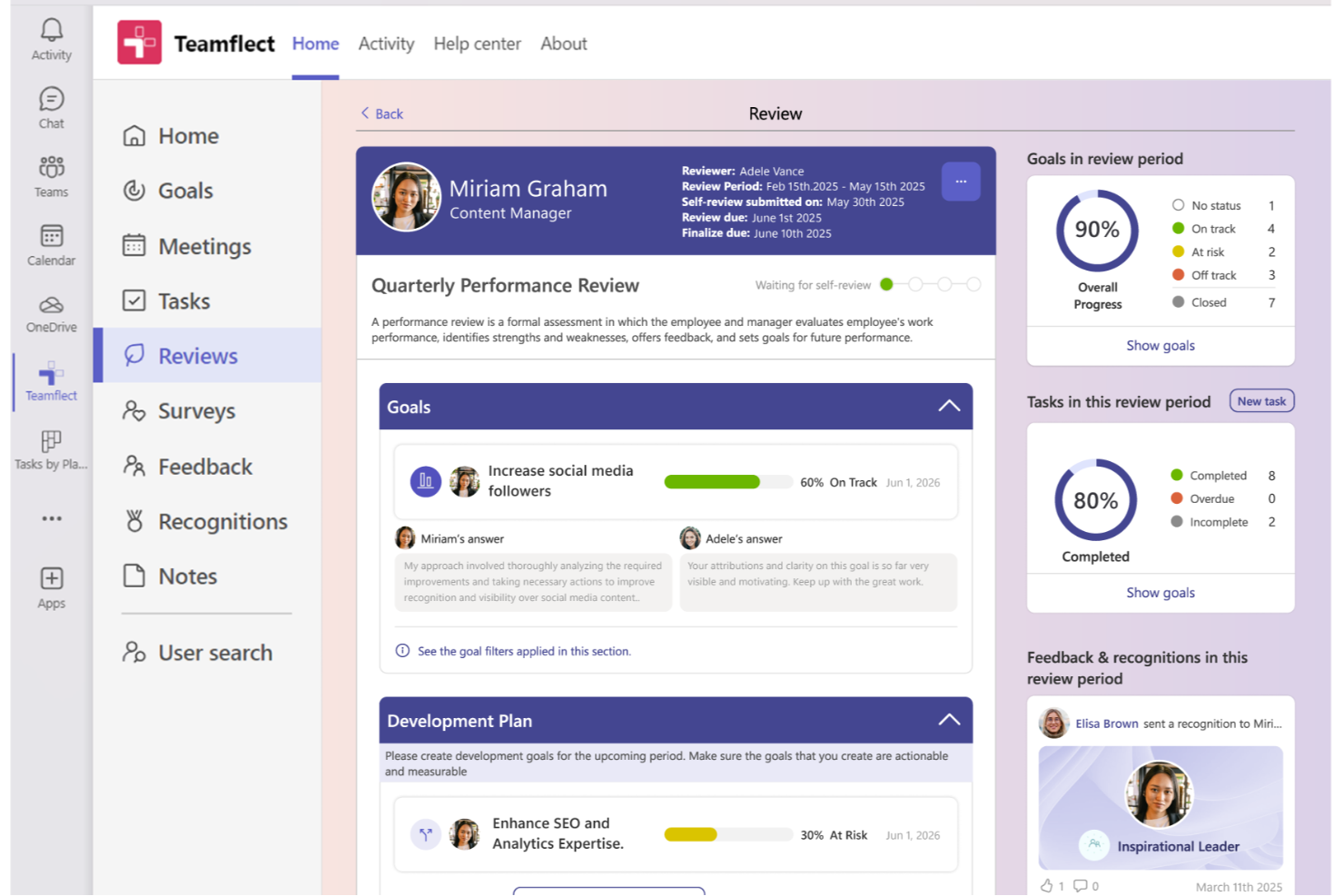
Teamflect is a performance management platform designed for organizations that use Microsoft Teams, helping HR teams and managers streamline reviews, feedback, and goal tracking directly within their existing workflow.
Who Is Teamflect Best For?
Teamflect is a great fit for mid-sized companies already using Microsoft 365 that want to manage performance without switching between tools.
Why I Picked Teamflect
I picked Teamflect as one of the best because it's the only performance management tool built to live natively inside Microsoft Teams—not just connected to it. I like that managers can run full review cycles, track goal progress, and exchange 360-degree feedback without ever leaving the Teams interface. This keeps my team from toggling between platforms during review cycles, improving adoption. The built-in AI assistant helps managers write stronger review comments, flags biased language in real time, and suggests personalized development goals after a review.
Teamflect Key Features
- 1:1 meeting templates: Run structured one-on-one meetings with pre-built agendas, talking points, and action item tracking directly inside Teams.
- Recognition and rewards: Send peer-to-peer recognition badges and awards within Teams to acknowledge employee contributions in real time.
- Task management: Assign, track, and update individual tasks tied to performance goals without leaving the Teams environment.
- Custom review templates: Build and deploy tailored performance review forms to match your organization's specific evaluation criteria and cycles.
Teamflect Integrations
Integrations include Microsoft Teams, Outlook, Power BI, BambooHR, Workday, UKG Pro, ADP, Gusto, Paylocity, and QuickBooks Payroll.
Pros and Cons
Pros:
- Review templates are highly customisable for your process
- Goal-setting tied directly to team workflows inside Teams chats and tasks
- Deep Microsoft 365 integration
Cons:
- Some advanced analytics/features require higher plans
- Only works if your organisation uses Microsoft 365
Other Performance Management Software
Still haven’t found the right performance management tool for your team? Here are some more worthwhile performance management software options that didn’t make it into the top 10 list but still deserve a special mention. Check them out!
- Primalogik
For scalable review processes
- ThriveSparrow
For AI-powered performance insights
- Express Evaluations
For small business, government & nonprofits
- Spidergap 360˚ Feedback
For actionable development insights
- Insightful
For real-time employee monitoring
- Sloneek
For 360-degree feedback integration
- iSpring LMS
For learning-driven performance reviews
- Effy AI
For AI-first performance management in SMBs
- Small Improvements
For lightweight review processes
- Profit.co
For real-time performance tracking
- 15Five
For weekly check-in workflows
- GoCo
For HR-integrated review automation
- HiBob
For modern, global teams
- Mirro
For real-time recognition features
- Kallidus Perform
For learning and performance integration
- Workday
For large enterprise HR ecosystems
- eloomi
For training and feedback in one
- Workleap
For flexible review cycles
- Synergita
For continuous performance conversations
- WorkDove
For customizable competency models
- PeopleFluent
For talent management integration
- SAP SuccessFactors
For multinational compliance support
- Insperity
For outsourced HR solutions
- Kazoo
For engagement and rewards programs
- Huckleberry
For AI-driven voice feedback
- Ascender HCM
For APAC payroll integration
- ClickUp
For project and performance alignment
- Motivosity
For peer-to-peer recognition
- monday.com
For workflow and performance tracking
- BambooHR®
For integrated HR management


Related HR Software Reviews
If you still haven't found what you're looking for here, check out these other related tools that we've tested and evaluated:
- HR Software
- Payroll Software
- Recruiting Software
- Employer of Record Services
- Applicant Tracking Systems
- Workforce Management Software
Selection Criteria for Performance Management Software
Selecting the right performance management software requires a deep understanding of the performance review process and how advanced software can alleviate common pain points.
Drawing on my personal experience preparing over 1,000 performance reviews, I developed a comprehensive approach to evaluating these tools. My experience also made it easier to pinpoint the features that add a lot of value and ensure a smooth and unbiased evaluation process — features I wish I'd had in the past!
Here's a summary of the main features I evaluated to create this list:
Core Performance Management Functionalities (25% of total score): To be considered for inclusion in my list of the best performance management software, the solution had to fulfill the following basic functionalities:
- Performance data management tools, either as a standalone product, or as a module within an HCM, HRIS, or HRMS application
- Comprehensive performance reviews and professional development plans that align with individual and company growth goals
- Goal setting and tracking tools to help users set clear, measurable objectives and monitor goal progress over time.
- Automation tools to streamline the scheduling, execution, and documentation of performance reviews.
- Real-time feedback mechanisms to gather and share continuous feedback between managers and employees.
- Reporting and analytics tools to save managers and HR professionals from the hassles of manual data calculations - my biggest pet peeve of all!
Additional Standout Features (25% of total score): To help me find the best software out of numerous available options, I also kept a keen eye out for unique features, including the following:
- 360-degree feedback tools to collect feedback from numerous sources to obtain a comprehensive view of an employee's performance
- Innovative goal-setting frameworks that incorporate OKRs or SMART goals.
- Advanced analytics with predictive capabilities for identifying talent risks and opportunities.
- Sophisticated data analysis and presentation tools, including data visualization options, trend identification tools, and flags for achievements or areas for improvement.
- Integrated employee development planning tools that link directly to performance outcomes.
- Customizable review cycles and feedback templates that adapt to various team and department needs.
- Mobile app availability, ensuring access and engagement with the platform anywhere, anytime.
- Helpful resources like performance improvement plan (PIP) templates and personalized career development plans.
Usability (10% of total score): To evaluate the usability of each system, I considered the following:
- An intuitive user interface that simplifies navigation and task completion.
- Automated workflows to ensure no performance reviews slip through the cracks.
- Role-based access controls that are straightforward to configure, accommodating different user needs within the organization.
- Interactive dashboards that present data in an easily digestible format.
- Integrations with other key HR systems (HCM, HRIS, or HRMS).
Customer Onboarding (10% of total score): To get a sense of each software provider's customer onboarding process, I considered the following factors:
- Comprehensive training materials, including videos, templates, and interactive product tours.
- Quick setup processes and clear guidance for first-time users, including customizable templates.
- Support for migrating historical data from previous systems into the new performance management platform
- Community forums or user groups that offer peer support and best practices.
Customer Support (10% of total score): To evaluate the level of customer support each vendor offered, I considered the following:
- Multiple support channels, including live chat, email, and phone.
- A responsive customer service team that offers quick, high-quality support.
- Access to a knowledge base or FAQs for self-service support.
Value for Price (10% of total score): To gauge the value of each software, I considered the following factors:
- Transparent pricing models that match the features and benefits offered.
- Flexible payment plans that suit businesses of different sizes, from small businesses to enterprise organizations.
- Free trials or demos that allow for a thorough evaluation before purchase.
Customer Reviews (10% of total score): Evaluating customer reviews is the final element of my selection process, which helps me understand how well a product performs in the hands of real users. Here are the factors I considered:
- Overall customer satisfaction scores and the frequency of positive feedback.
- Customer feedback that highlights how the tool has impacted performance review processes.
- Specific praises, criticisms, or trends in customer feedback that indicate the software's strengths or areas for improvement
Using this assessment framework helped me identify the performance management software that goes beyond basic requirements to offer additional value through unique features, intuitive usability, smooth onboarding, effective support, and overall value for price.
How to Choose a Performance Management Tool
Performance management software can help you streamline all aspects of your performance review process, including gathering feedback, tracking goals, and reviewing analytics.
To help you figure out which performance management software best fits your needs, keep the following points in mind:
- What performance challenges are you trying to solve? Identifying your current challenges will guide you to select software with the features and functionalities you need to overcome them. These challenges may include:
- Difficulty tracking goals and development progress,
- Infrequent, inconsistent, or unclear feedback,
- Difficulty aligning team goals with company objectives, or
- Performance evaluations that are not transparent or consistent between teams.
- Who are your main users? Consider who will use the tool, who your different user groups are, and how many licenses you'll need. Once that's clear, it's also useful to list the needs of your different user groups (power users, managers, employees, etc.) to ensure they're all met.
- For performance management software, you'll need employee-level access for your entire workforce, and separate access roles for your managers and HR administrators.
- What is your budget? To evaluate cost, do a headcount of your existing workforce, plus your projections for the next 5 to 10 years. Since most performance management tools charge a monthly fee per employee, this will help you proactively estimate your monthly costs.
- Determining a realistic budget for your new performance management software up-front is crucial, so you don't waste time considering software that's too expensive.
- What outcomes are important? Review the capabilities you want to gain or improve, and how you will measure success. Being clear on your desired outcomes upfront is crucial to avoid wasting valuable time. Key outcomes you may want to measure include:
- Achieving a performance management cycle that is fully automated,
- Gaining the ability to compare current and previous employee reviews easily,
- Integrated goal tracking and progress monitoring tools, or
- Increased manager and employee satisfaction regarding your performance review cycle.
- Do you require specific software integrations? Clarify whether your new performance management tool will replace existing tools or need to integrate with them. Key systems to integrate with include learning management systems, training management software, or feedback collection tools.
- Can you reduce your monthly SaaS costs by replacing multiple tools with an all-in-one performance management tool?
- Are all the integrations you need available, or can they be custom-configured using an API?
- Does the performance evaluation tool satisfy your technical requirements? Consider the tool selection alongside your existing workflows and systems. Evaluate what's working well, and any problem areas that need to be addressed.
- Does the new system integrate with your corporate workspace (Microsoft SharePoint, Google Workspace, etc.)?
- Does the new system offer security features that meet your needs (e.g., two-factor authentication (2FA), etc.)?
Remember, every business is different — don’t assume that a performance management tool will work for your organization just because it's popular. Instead, focus on your specific needs and challenges and look for software that specifically addresses those gaps, so you'll get the most out of your new purchase.
How to Implement Performance Management Tools
Once you've chosen the winning performance management system for your needs, you'll need to develop an implementation plan to integrate the software into your employee review process.
To do this right, I recommend using the following approach:
- Develop an implementation strategy and timeline that defines the who, what, when, where, and why related to the new software implementation.
- Gather feedback from managers on their current challenges with the employee performance review process and how it could be improved.
- Gather feedback from employees on their experience of your current review process and how it could be improved.
- Form an internal implementation team that includes key stakeholders from all your user groups (i.e., your HR team, managers, employees, IT department, etc.)
- Review your existing performance management data and decide whether you need to migrate this information into the new system or not.
- If you do decide to migrate a lot of data, reach out to your software provider for assistance with this portion. They can often upload historical data in bulk as part of the customer onboarding process.
- Run some test reviews to help you understand how all the features work. This includes building workflow automations and setting up software integrations to pull data from other sources.
- This step is very important, and shouldn't be rushed. Run as many test scenarios as you can think of using different employee structures (i.e., full-time, part-time, post-leave, employees on probation, etc.) and reporting structures (i.e., employees with two managers, employees who support multiple teams, etc.). This will help you ensure the software covers all your needs once it's fully launched.
- Train your users on how to use the software. This should include role-specific training for managers and team leads who need to conduct performance reviews, as well as separate training for employees. You may also want to offer support documentation or create an internal wiki or repository for frequently asked questions. Doing so will proactively reduce the volume of administrative requests your HR staff will receive going forward.
- Launch the software and celebrate! This may sound a little cheesy, but it's actually really important. Celebrating the benefits of the new software can positively impact user adoption rates. If people are excited about the new software, they will be more likely to use it and have a positive association with it.
Trends in Performance Management Tools
Performance management looks pretty different today than it did a few years ago. More and more, organizations are opting to implement continuous performance discussions in place of annual reviews, and holistic 360-feedback forms in replace of top-down evaluations. And the software that runs these performance management tasks is keeping pace!
Today's performance management software not only streamlines performance evaluations but also directly impacts employee engagement, retention, and development.
Here's a look at the prominent trends and how they're shaping the future of performance management tools:
- Integration with AI and Machine Learning: Many AI performance management tools are incorporating AI to help with performance reviews by assisting with personalized performance insights, automated feedback suggestions, and predictive analytics. This trend underscores the growing need for data-driven decision-making and personalized development plans in performance management.
- Continuous Feedback and Real-Time Recognition: The move away from annual reviews towards continuous, real-time feedback mechanisms is evident. Tools are evolving to facilitate more frequent interactions, with features for instant recognition and feedback becoming standard. This reflects the shift towards a more dynamic, ongoing performance dialogue between employees and managers.
- Peer-to-Peer Feedback: In collaborative work environments where teamwork and cross-functional projects are common, gathering insights from peers is integral for effectively evaluating employee performance—not to mention eliminating bias. 360 feedback tools offer a more comprehensive view of an employee's performance and contributions.
- Enhanced Goal Setting and Tracking: There's a noticeable improvement in the sophistication of goal-setting features, including the integration of OKRs (Objectives and Key Results) and customizable goal templates. This trend highlights the importance of clear, measurable goals in aligning individual performance with organizational objectives.
These trends indicate a shift towards more personalized, continuous, and development-oriented performance management practices. To see these trendy features in action, I recommend reading our review of Betterworks or our review of Leapsome next.
Essentially, the expectations and demands of HR specialists and organizations are changing, which is driving the development of tools that are not only more effective in managing performance but also in enhancing employee engagement and development.
Some parts of the performance review that are data-driven can be assessed by AI, but interpersonal and soft skills require a human touch. Performance management is more than just the review itself—it’s about ongoing one-on-ones, managing relationships, and motivating employees.
What is Performance Management Software?
Performance management software is a digital tool that helps HR teams evaluate employee performance, set goals, and facilitate continuous feedback.
It’s used by HR professionals, managers, and team leads to streamline employee review cycles, track development, and align individual performance with company objectives.
These tools reduce manual effort, prevent missed reviews, and offer insights that support fair evaluations and strategic workforce planning.
Features of Performance Management Software
When selecting performance management software, keep an eye out for the following key features:
- Goal setting and tracking: This feature allows you to set clear, measurable objectives for each employee or team. You can track progress in real time, keep everyone aligned, and easily identify when goals need adjustment—all the while making achievements motivating and visible for everyone involved.
- Continuous feedback: With this, you can give and receive feedback in a timely, informal way—not just during annual reviews. It encourages regular conversations that help employees grow, course-correct faster, and feel more supported at work.
- Performance appraisal workflows: These automated workflows help you run performance reviews consistently and fairly, making the review process less tedious and more transparent. You can customize who reviews whom, schedule reminders, and ensure nothing falls through the cracks.
- Real-time analytics and dashboards: Get a quick, visual overview of employee performance trends and key metrics. These analytics help you spot patterns, make data-driven decisions, and confidently address performance issues before they become larger problems.
- Development and training plans: Easily create, assign, and monitor personalized development plans based on each employee’s strengths and areas for improvement. This helps you put growth at the center of performance conversations, showing your team you’re invested in their future.
- Customizable review templates: Use flexible templates to match your organization’s unique review process. You can set up questions and rating scales that matter most to your team, helping everyone focus on what really counts.
- Integration with HR systems: Seamlessly connect your performance management software to payroll, HRIS, and other essential tools. This minimizes manual entry, ensures accuracy, and makes cross-functional processes (like promotions or compensation changes) smoother.
- Data security and compliance: Protect your employee data with robust security measures and compliance with relevant regulations. This reassures everyone that their information is private and handled responsibly.
Common Performance Management Software AI Features
Beyond the standard performance management software features listed above, many of these solutions are incorporating AI with features like:
- Bias detection in reviews: AI flags potential biases in performance appraisals, encouraging fairer assessments and helping you foster an inclusive culture.
- Automated performance insights: AI analyzes feedback, reviews, and goals to highlight trends or potential issues before you spot them yourself. This helps you address needs early and take proactive action.
- Smart feedback prompts: AI suggests constructive feedback or recognition moments based on real-time data, helping you coach and support employees even when you’re busy.
- Sentiment analysis: AI processes written feedback to detect employee sentiment, giving you a deeper read on morale and team dynamics—without needing to read every comment yourself.
- Intelligent goal recommendations: AI recommends new goals or development paths based on individual progress and company objectives, making sure everyone moves in the right direction.
Performance management can motivate employees by showing how their goals connect to the company’s objectives. Without clear goals and alignment, it’s hard to foster a culture of performance and progression.
Benefits of Performance Management Software
Performance management tools offer a structured approach to evaluating and enhancing employee performance, aligning individual goals with organizational objectives. More specifically, here are several benefits you can expect to gain my implementing a performance management tool in your organization:
- Enhanced Goal Alignment: Ensures individual objectives are in sync with company goals. By aligning employee goals with organizational targets, performance management tools help ensure that every team member works towards the same overarching objectives, thereby improving overall productivity and focus.
- Continuous Feedback Loop: Facilitates real-time feedback and communication. This feature allows for immediate recognition and constructive criticism, enabling employees to adjust their performance proactively and managers to address issues as they arise, fostering a culture of continuous improvement.
- Increased Employee Engagement: Promotes a more engaged workforce. Performance management tools help in recognizing and rewarding employees' efforts, which significantly boosts morale and engagement, leading to higher job satisfaction and retention rates.
- Data-Driven Decisions: Provides actionable insights through analytics. With access to comprehensive data on employee performance, organizations can make informed decisions regarding promotions, training needs, and succession planning, ensuring the right talent is developed and retained.
- Streamlined Evaluation Process: Automates and organizes performance reviews. By standardizing the review process and making it more efficient, these tools save time and reduce the administrative burden on HR departments, allowing them to focus on strategic initiatives.
Performance management tools not only streamline administrative processes but also foster a culture of continuous improvement and engagement across your organization. Investing in the right performance management tools is a strategic move that can lead to significant improvements in organizational effectiveness and employee fulfillment.
Costs & Pricing for Performance Management Software
Pricing and plan options for performance management tools can vary widely based on features, scalability, and support levels, catering to the diverse needs of businesses of all sizes. Understanding the common plan options and their pricing helps you make an informed decision that aligns with your organization's requirements and budget.
Plan Comparison Table for Performance Management Software
Here's an overview of the types of pricing plans available for these tools, and their average costs:
| Plan Type | Average Price | Common Features |
|---|---|---|
| Free | $0 | Basic performance reviews, goal setting, limited number of users, self-service support |
| Basic | $5-10 per user/month | Enhanced performance reviews, goal tracking, real-time feedback, email support |
| Professional | $10-30 per user/month | Custom review cycles, 360-degree feedback, analytics and reporting, priority email support |
| Enterprise | $30-60 per user/month | Advanced analytics, succession planning, learning and development integration, dedicated support |
| Custom | Custom Pricing | All Enterprise features plus custom integrations, scalability options, personal account manager |
When considering which plan to choose, evaluate your specific needs and the value that each plan would bring to your performance management process. It's important to balance the need for advanced features against budget constraints, ensuring that the chosen solution provides the necessary tools to support and enhance employee performance effectively.
While it's understandable that you may want to start with a basic plan initially, there are several reasons why you may want to opt for a more advanced plan, including:
- Enhanced Reporting Needs: Basic plans often lack in-depth analytics. Upgrading provides comprehensive reporting features to help you make better data-driven decisions.
- Goal Alignment and Tracking: If you need more robust goal-setting and tracking capabilities, you'll likely need to upgrade to access those features. However, it's worth it to ensure that employee goals align with company objectives and gain tools to monitor progress.
- Customizable Feedback Systems: As your organization matures, you might need more tailored feedback mechanisms. Advanced plans offer customizable feedback and review templates to suit your unique needs.
- Increased Number of Users: Most basic plans limit the number of users you can have (including admin users and managers). As your company expands, you'll need to scale up to gain more user seats, plus more extensive features.
Ultimately, it's important to secure a plan that offers the features you require to satisfy your current needs and solve your challenges without exceeding your budget.
What I’ve seen lately is this big consolidation of HR tools… companies are looking for platforms that can handle everything from hiring to performance management in one place.

Performance Management Frequently Asked Questions
Here are some answers to frequently asked questions related to performance management processes and appraisal software.
How often should performance reviews or appraisals be conducted?
Ideally, you should hold formal performance reviews once or twice a year, but support those annual or biannual conversations with frequent, informal check-ins or feedback sessions. Many organizations use quarterly reviews or structured monthly one-on-ones to help employees stay on track and to resolve issues early.
Use your performance management tool to automate scheduling, to send reminders to managers and employees, and to track when reviews are completed. This helps ensure consistency, transparency, and more meaningful development outcomes.
More frequent reviews or check-ins helps maintain a culture of continuous feedback between managers and employees, leading to more growth and agility. It’s all about finding the right balance that suits your organization’s culture and objectives.
How have performance management tools adapted for remote and hybrid teams?
Performance management software now prioritizes features that support distributed teams, such as mobile access, cloud-based dashboards, and asynchronous feedback tools. Many platforms allow goal tracking, pulse surveys, and recognition to be managed digitally so every employee—regardless of location—stays engaged and visible. Video call integrations, chat features, and notifications also help managers keep remote team members included in feedback cycles and ongoing conversations.
Look for solutions that make performance documentation accessible from anywhere and let you customize processes for both onsite and remote staff.
How can managers address underperformance effectively?
To address underperformance, start by using your software’s analytics and historical performance data to spot patterns or gaps. Meet with the employee to understand any underlying issues, and jointly set clear, actionable goals for improvement.
Many platforms provide templates for performance improvement plans (PIPs), plus automated reminders, and spaces to document feedback. Regularly review progress together and adjust support as needed. Leveraging the software creates a transparent record and helps ensure accountability for everyone involved.
What is continuous feedback and how can software support it?
Continuous feedback is an ongoing process of sharing observations, praise, and constructive suggestions, rather than limiting feedback to formal review periods. Performance management software supports this with features like real-time feedback buttons, peer recognition, micro-surveys, and automated prompts that remind managers to give feedback frequently.
Continuous feedback fosters open communication, helps identify challenges early, and creates a more responsive workplace culture. Features that support anonymous feedback or cross-team input can also improve trust and adoption.
Research has shown that organizations that use a continuous feedback model outperformed their competition by 24%. Similarly, companies who use continuous feedback models are 39% better at attracting top talent, and 44% better at retention.
How do performance management platforms handle data privacy and security?
Most vendors encrypt your data, both in transit and at rest, and store it in secure, audited data centers. Role-based permissions let you control who sees different kinds of employee information, and most systems allow you to generate audit trails for compliance purposes.
When selecting a tool, look for standards like GDPR, SOC 2, or ISO certifications, and inquire about features such as multi-factor authentication and regular security updates. Review vendor privacy documentation and conduct a risk assessment aligned with your organization’s needs.
What integrations should I prioritize when choosing performance management software?
You should prioritize integrations with your HRIS or core HR platform, payroll system, and communication tools like Slack or Microsoft Teams to streamline data flow and notifications. If your organization offers training or development programs, look for learning management system (LMS) integrations. Single sign-on (SSO) can also simplify access.
Overall, look for integrations that reduce administrative work and ensure that performance insights are easily connected to broader HR metrics and reporting.
How do I measure ROI on a performance management platform?
To measure ROI, compare employee engagement, turnover, and productivity metrics—including before and after implementation. Track how completion rates for reviews and goal attainment improve with automation. Survey employee satisfaction with the review process itself, and monitor any reduction in HR admin time. Use the platform’s native analytics to generate usage reports and summarize results for leadership. ROI can also show up in softer outcomes, like improved morale or manager capability.
Can performance management tools help with succession planning?
Yes, many performance management platforms now offer tools for succession planning and talent mapping. You can use assessment data, competency matrices, and talent pool tracking features to identify future leaders and plan professional development. These tools let you track readiness and gaps for critical roles, making it easier to set targeted development goals for high-potential employees and build a strong internal pipeline for advancement.
What reporting and analytics features are most important in a performance management tool?
The most helpful tools offer customizable dashboards that let you visualize trends in goal achievement, competency ratings, engagement, and review completion. Look for options to filter or break down data by team, department, role, or tenure.
Advanced reporting features let you export data, schedule regular reports, and use predictive analytics to flag areas for intervention. Integration with HR analytics tools can deepen your insights and support more strategic workforce planning.
How do I ensure employee adoption of a new performance management system?
Start by involving employees and managers early in the selection and rollout process to build buy-in. Choose a platform with an intuitive, user-friendly interface and provide hands-on training plus ongoing access to support resources. Communicate the “what’s in it for me” clearly, focusing on how the new system will make feedback, growth, and recognition easier. Encourage early adopters to share their experience, gather feedback to refine your rollout, and celebrate initial wins to drive broader engagement.
Other Performance Software Reviews
If you're looking for another type of performance-related software, look no further. To save you time, here are some links to my other performance-related reviews:
- Talent Management Software
- Employee Experience Software for Engagement & Performance
- Succession Planning Software to Develop Future Leaders
- Mentoring Software for Mentors and Mentees
- Employee Engagement Software
- Goal Setting Software for Keeping Teams on Track
- Productivity Tracking Software for Hybrid Teams
- OKR (Objectives and Key Results) Software
Final Thoughts
I hope this article got you one step closer to finding the right performance management tool for your organization.
These systems are an important tool in every HR team's operational tool belt since they automate large portions of the process, taking the stress of running a performance review cycle off your shoulders for good.
They'll also help your staff reach their full potential while documenting their career progress toward their individual career development goals.
Stay in Touch
Finding the right performance management software can transform the way you support, develop, and retain top talent.
Now that you’ve explored the top solutions, the next step is choosing the one that best fits your needs. Consider your company’s size, performance management goals, and must-have features as you narrow down your options. Many platforms offer free trials, so take advantage of them to see how the software fits into your workflow.
No matter which tool you choose, investing in performance management software is a step toward a more engaged, high-performing workforce.
I also recommend subscribing to our People Managing People newsletter. You'll get updates on our latest articles and podcasts from HR experts around the world.